
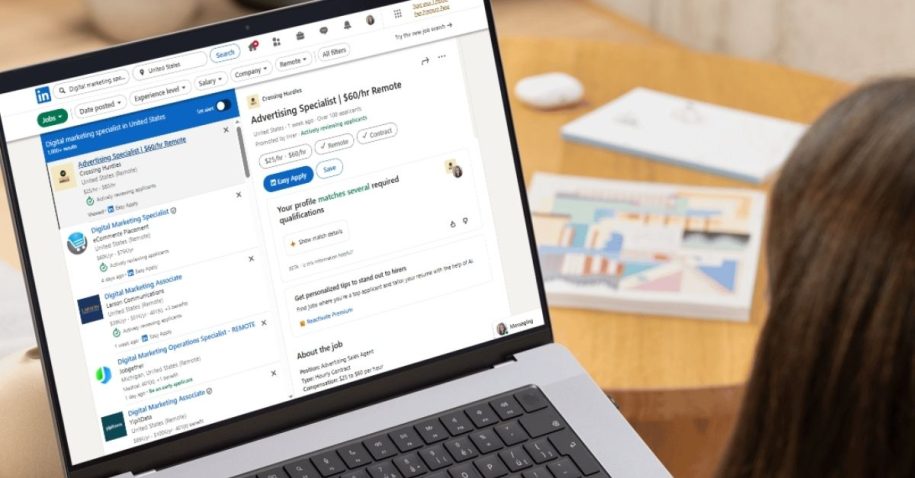
LinkedIn Easy Apply lets you apply to 40 jobs in one hour. It feels productive. It feels like momentum. Easy Apply makes applying effortless. It does not make you visible.
If you’ve been sending dozens of applications and hearing nothing back, the issue isn’t effort. It’s structure. Convenience doesn’t equal results.
Let’s break down how LinkedIn Easy Apply actually works, where it falls short, and how to build a system that turns clicks into interviews.
What is Linkedin Easy Apply?
To understand why your results might be lackluster, you first need to understand exactly what is Linkedin Easy Apply.
It is a feature designed by LinkedIn to reduce the friction between a job seeker and a job application. In the traditional model, you click “Apply,” get redirected to a company’s career site, create a new login, verify your email, and spend 20 minutes re-typing your resume into individual boxes.
Easy Apply on Linkedin bypasses that entire process.
When you click the blue “Easy Apply” button, LinkedIn takes the data already on your profile, your photo, headline, past experience, and education and bundles it with your attached resume. With one or two more clicks, that packet is sent directly to the job poster’s LinkedIn Recruiter dashboard.
It is designed for speed. It allows mobile users to apply while commuting. It allows passive candidates to throw their hat in the ring without committing an hour to a form.
However, this design philosophy prioritizes quantity over quality. By removing the barriers to entry, LinkedIn has created a system where the cost of applying is near zero. When the cost of applying drops, the volume of applications skyrockets.
This is the fundamental trade-off. You get speed, but you lose the ability to tailor your application deeply unless you are extremely disciplined. You rely heavily on your LinkedIn profile optimization and your uploaded resume matching the job description perfectly on the first try.
Does Linkedin Easy Apply work?
The short answer is yes. People do get hired through it.
The long answer is much more complicated. When you ask does Linkedin Easy Apply work, you have to define what “work” means. Does it successfully transmit your data to a recruiter? Yes. Does it give you a competitive advantage? Rarely.
Here is the reality from the other side of the screen.
When a recruiter posts a job with the Easy Apply Linkedin option enabled, they often receive hundreds of applications within the first 24 hours. Because the barrier to entry is so low, many of these applicants are unqualified or “serial appliers” who click the button on every job they see.
To manage this flood, recruiters rely on filters. They use LinkedIn’s built-in applicant tracking tools to sort by keywords, location, and “deal-breaker” questions. If your profile does not match these specific criteria, your application might be archived without a human ever reading your name.
Easy Apply increases the volume of your output. It does not increase your differentiation.
According to data on hiring trends, a significant portion of hires still come from referrals and direct sourcing, not cold applications. When you use Easy Apply, you are entering the “coldest” possible channel. You become a digital file in a stack of hundreds.
So yes, it works as a delivery mechanism. But relying on it as your sole strategy is a recipe for silence.
The hidden problem with Easy Apply Linkedin users don’t see
The real danger of Easy Apply Linkedin features is not technical. It is behavioral.
The button creates a false sense of accomplishment. You can spend an hour on your couch, tap your phone screen fifty times, and feel like you have done a hard day’s work. You tell yourself, “I applied to 50 jobs today.”
But what happens next?
The hidden problem is the lack of a data trail. When you apply through a company website, you usually get a confirmation email. You might create an account where you can check your status.
With Easy Apply, the confirmation is often just a fleeting notification or a generic email from LinkedIn.
Most candidates apply and move on immediately. They do not record the job title. They do not save the job description. They do not note the name of the hiring manager.
Two weeks later, if a recruiter actually calls you, you might find yourself in an embarrassing situation. You have to ask, “I’m sorry, which role is this for again?”
This lack of organization kills your conversion rate.
When you do not track your applications, you cannot follow up. If you cannot follow up, you remain just another name in the database. You lose control over your own process. You are waiting for lightning to strike instead of building a lightning rod.
Furthermore, Easy Apply on Linkedin often limits your ability to tell your full story. You usually cannot attach a cover letter unless there is a specific optional field for it. You cannot customize your “Why I want this job” answer beyond a few character limits, if that question is asked at all.
You are trading your narrative for convenience.
Is there a Linkedin Easy Apply limit?
LinkedIn does not publish an official hard number for how many jobs you can apply to in a single day. However, power users and career coaches have noticed patterns that suggest practical limits exist.
If you apply to an excessive number of jobs in a short window, think 50 to 100 applications in a few hours, LinkedIn’s algorithms may flag your account for spam-like behavior.
This can result in a few different scenarios:
- You might be temporarily blocked from applying to more jobs.
- You might be asked to solve CAPTCHAs for every single application, slowing you down significantly.
- In worst-case scenarios, your applications might be deprioritized or “shadowbanned,” meaning they are sent but appear lower in the recruiter’s stack.
There is also a “soft limit” imposed by the recruiters themselves. Some applicant tracking systems (ATS) integrated with LinkedIn can recognize if the same candidate has applied to 10 different roles at the same company in one week. This does not make you look eager. It makes you look desperate and unfocused.
Quality degradation is another form of limit. It is physically impossible to submit 50 high-quality, tailored applications in a day. As you push against the volume limit, your quality limit plummets. You stop checking if your resume matches the keywords. You stop reading the full job description.
The limit is not just what the platform allows. It is what your attention span can handle before you start making mistakes.
Why easy apply jobs on LinkedIn feel so competitive
Have you ever noticed that Easy Apply jobs LinkedIn displays often show applicant counts like “Over 200 applicants” within hours of posting?
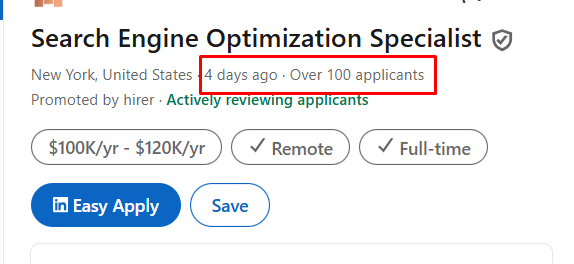
This is the psychology of the path of least resistance.
Because the friction is removed, everyone takes the path. You are not just competing with active job seekers who carefully selected the role. You are competing with the casually curious, the employed people just “browsing,” and the bots that automatically submit applications based on keywords.
This inflates the numbers. It creates a highly competitive environment where standing out becomes exponentially harder.
The algorithm also plays a role here. LinkedIn wants to show you jobs you are likely to apply to. If you frequently use Easy Apply, the algorithm feeds you more Easy Apply jobs. You end up in a feedback loop, seeing the same high-volume roles that everyone else is seeing.
Internal referrals and sourced candidates often outrank these blind applications. A recruiter will always look at a referral from a colleague before they open the Easy Apply queue.
When everyone applies easily, standing out requires doing the things that are hard.
What most job seekers do wrong after Easy Apply
The moment you click “Submit Application,” the real work should begin. For 95% of job seekers, however, that click is the end of the process. This is the critical mistake.
Here is what usually happens:
- The Black Hole Effect: The candidate clicks apply and immediately forgets the company name.
- The Generic Resume: They use one standard resume for every single Easy Apply click, regardless of whether the job is a 100% match or a 60% match.
- The Passive Wait: They sit back and wait for the phone to ring.
This approach cedes all power to the employer. You are essentially saying, “Here is my info, do with it what you will.”
Another common error is failing to capture the job description. Companies often take down job postings once they have enough applicants. If you get an interview request three weeks later, and the posting is gone, you have no way to prepare. You don’t know the specific requirements or responsibilities they listed.
Candidates also fail to map their network. They don’t check if they have 1st or 2nd-degree connections at the company immediately after applying. They treat the application as a transaction rather than an opening move in a networking strategy.
Easy Apply creates speed. It does not create structure. Without structure, you cannot optimize your search. You cannot analyze which versions of your resume are performing best. You cannot see that you are getting rejected from every Senior Manager role but getting interviews for Lead roles.
You are flying blind.
What to do instead (without abandoning Easy Apply)
The solution is not to stop using Easy Apply on LinkedIn. The tool is too valuable to ignore completely. The solution is to layer a professional system on top of the convenience.
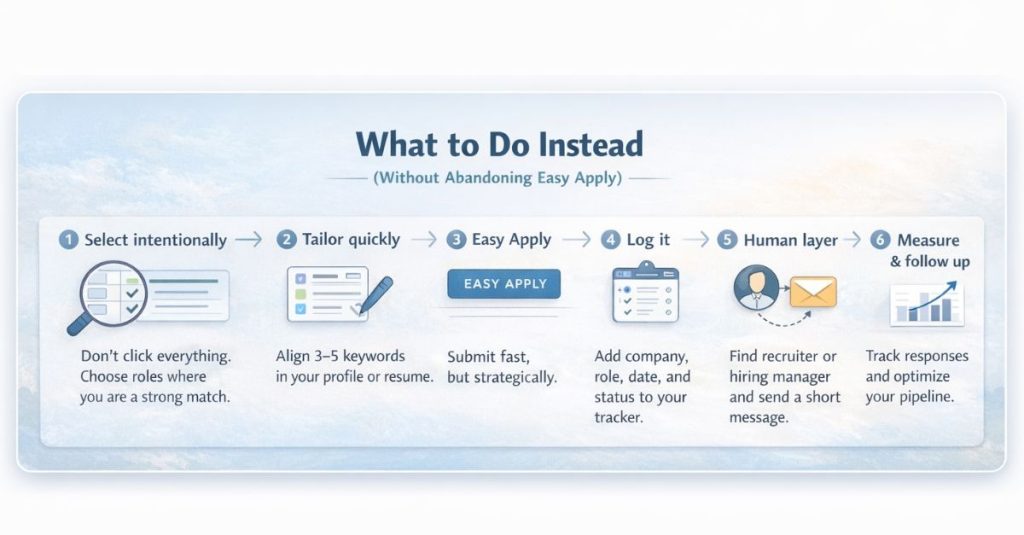
You need to shift from being an “applicant” to being a “project manager” of your career search.
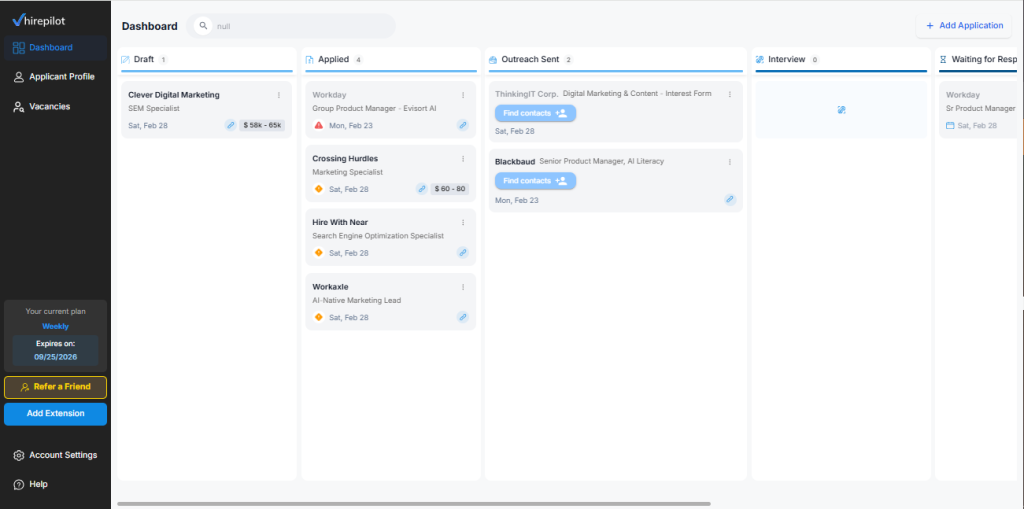
1. Build a centralized tracker
You cannot improve what you do not measure. You need a single place where every application lives.
Whether you use a spreadsheet or a dedicated tool, your tracker needs to capture:
- Company Name
- Job Title
- Date Applied
- Link to Job Posting
- Status (Applied, Interview, Rejected)
- Next Follow-up Date
This transforms your search from chaos into a pipeline. You can see at a glance that you have 15 active applications that need a follow-up email this Thursday.
If you struggle with the discipline of manual data entry, consider using job tracking tools that organize your search automatically. These tools can often scrape the data from the job page so you don’t have to copy-paste, ensuring you never lose track of an opportunity.
2. Autofill, don’t just Easy Apply
Sometimes the best jobs don’t have the Easy Apply button. They require you to apply on the company site. Many candidates skip these because they are “too hard.”
Do not skip them. These jobs often have less competition specifically because they are harder to apply to.
To maintain your speed without sacrificing quality, use browser extensions that handle the repetitive typing for you. This gives you the speed benefit of Easy Apply on any job board, while still allowing you to submit a formal application that might carry more weight.
3. The two-pronged attack
Use Easy Apply to get your resume in the system. Then, immediately go to the company’s LinkedIn page.
Find the hiring manager or a recruiter in that department. Send a connection request or an InMail.
“Hi [Name], I just applied for the [Role] via LinkedIn. I’ve been following [Company]’s work in [Area] and believe my background in [Skill] would be a great fit. I’d love to connect.”
This moves you from the “faceless digital pile” to a “real human being.” Reaching hiring managers directly is often the deciding factor in who gets the interview.
4. Optimize for the machine
Since Easy Apply relies heavily on your LinkedIn profile, you must ensure your profile is fully optimized with keywords.
If the job description asks for “Project Management,” “Agile,” and “JIRA,” and your profile only says “Managed projects,” you are invisible. The automated filters will screen you out before a human sees your application.
Learning how to bypass ATS filters is essential for Easy Apply success. Your headline, summary, and experience sections must be aligned with the roles you are targeting.
A smarter way to use Linkedin Easy Apply
We need to redefine how you use this button. It is not the whole strategy; it is just the entry point.
The new workflow:
- Scan and select: Don’t click on everything. Spend 30 seconds reading the description to ensure you are actually qualified.
- Quick tailor: If the application asks for a resume upload, take 2 minutes to tweak your summary or skills section to match the job description keywords.
- Click Easy Apply: Send the application.
- Log It: Immediately add the role to your job tracker. Save the job description text.
- Schedule follow-up: Set a reminder to check in after 5–7 business days if you haven’t heard back.
- Outreach: Find a human at the company and send a personalized message.
By tracking your data, you will start to see patterns. You might realize that Easy Apply Linkedin works great for mid-sized companies but fails for large tech giants. You might see that your outreach messages are getting a 40% response rate, which tells you to double down on networking.
This is how you turn a lottery ticket into a calculated business process.
According to a report by the Society for Human Resource Management (SHRM), the average time-to-fill for a position is dozens of days. You need the stamina and organization to stay relevant throughout that entire window. A single click on Day 1 is not enough to keep you top-of-mind on Day 20.
FAQ: LinkedIn Easy Apply
What is LinkedIn Easy Apply?
It is a feature that allows job seekers to apply for jobs directly on LinkedIn with just a few clicks, using their profile data and a stored resume, rather than being redirected to a company’s external career website.
Does LinkedIn Easy Apply work?
Yes, it works effectively to submit applications, but because it is so easy to use, competition is fierce. Success usually requires combining Easy Apply with direct networking and profile optimization.
Is there a LinkedIn Easy Apply limit?
While there is no official public Linkedin Easy Apply limit, users who apply to excessive amounts of jobs (e.g., nearly 100 in a day) may trigger spam filters, be asked to complete CAPTCHAs, or see their account temporarily restricted.
How many Easy Apply jobs should I apply to per day?
Quality beats quantity. Aim for 10–15 high-quality applications where you are a strong match, rather than 50 random ones. This manageable volume allows you time to track them and send follow-up messages.
Do recruiters prioritize Easy Apply candidates?
Generally, no. Recruiters prioritize the best candidates regardless of how they applied. However, Easy Apply candidates often arrive in the system faster. The downside is that Easy Apply pools are often cluttered with unqualified applicants, sometimes causing recruiters to view that source with more skepticism compared to referrals or direct sourcing.
Stop clicking, start connecting
The goal of your job search is not to get “Applied” notifications. The goal is to get interviews.
Stop measuring your job search by how many times you click the blue button. That is a vanity metric. It makes you feel busy, but it does not move the needle.
Start measuring your search by:
- Follow-ups sent.
- Recruiter conversations started.
- Interviews scheduled.
Easy Apply opens the door. Strategy gets you inside.
If you are tired of the chaos and want to take control of your career, you need to move beyond simple clicks. Effective follow-up strategies and organized tracking are the differentiators that separate the hired from the ignored.
If you’re serious about turning LinkedIn Easy Apply into interviews, don’t rely on memory or scattered spreadsheets. Use a dedicated job tracker with autofill and built-in recruiter and hiring manager search tools, so every application is organized, personalized, and followed by strategic outreach. You already have the ambition. Now give yourself the system to match it.