
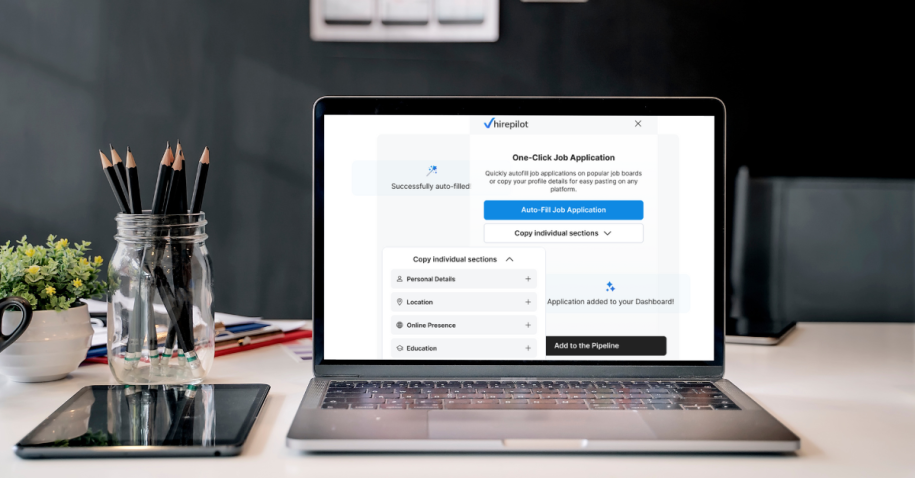
The job search can often feel like a full-time job. You spend hours sourcing opportunities and tailoring your resume, only to face the most tedious part: filling out application after application. Re-entering the same personal information, work history, and educational background across dozens of platforms is a frustrating, repetitive cycle. This can lead to application fatigue and burnout before you even land an interview.
We believe your time is better spent preparing for interviews and networking with key decision-makers. This is precisely why we developed the HirePilot application auto-fill feature. It’s designed to eliminate the manual, time-consuming data entry that slows you down, allowing you to apply for more roles in less time and with greater accuracy. This guide will walk you through everything you need to know to master this powerful tool, transforming your application process from a chore into a strategic advantage.
Why application automation is a game-changer
In a competitive job market, speed and efficiency are critical. Recruiters often receive hundreds of applications for a single opening, and candidates who apply quickly and accurately have a distinct advantage. As SHRM highlights, AI and automation remove repetitive tasks and improve the candidate experience. This is where automation tools like HirePilot’s auto-fill come in, offering significant benefits that empower you to take control of your job search.
The high cost of manual applications
Before diving into the solution, let’s acknowledge the pain points of the traditional application process:
- Time drain: The average job application can take anywhere from 15 to 30 minutes to complete manually. Applying to just 10 jobs a week could consume over five hours, time that could be used for interview prep or networking. Forbes emphasizes that applying quickly increases your chances of being noticed by recruiters, speed can be a decisive factor in today’s hiring process.
- Data entry errors: When you’re manually entering the same information repeatedly, the risk of typos and inconsistencies increases. A simple mistake in your phone number or email could mean a missed opportunity.
- Application fatigue: The sheer monotony of filling out forms can be demoralizing. This often leads to a drop in motivation, causing you to apply to fewer jobs or abandon applications midway.
Learn more about how technology is automating and refining recruitment, helping both candidates and hiring teams save time and reduce human error.
Key benefits of using HirePilot application auto-fill
Automating this process with HirePilot addresses these challenges head-on, giving you a powerful edge.
- Accelerate your applications: The most immediate benefit is speed. What once took 30 minutes can now be done in a fraction of the time. This allows you to significantly increase the volume of targeted applications you can submit each day.
- Improve data accuracy: By using a central profile as your single source of truth, the auto-fill feature ensures every application is populated with consistent, error-free data.
- Enhance the candidate experience: A smoother, faster process reduces frustration and keeps you motivated. A positive candidate experience is crucial for maintaining momentum during your job search.
- Focus on high-value activities: With tedious data entry handled, you can redirect your focus to what truly matters: customizing your cover letter, networking with hiring managers, and preparing to ace your interviews. This strategic shift is key to career acceleration.
How HirePilot application auto-fill works
Our HirePilot application auto-fill tool is more than just a simple form filler. It uses sophisticated resume parsing technology and intelligent field mapping to accurately transfer your information from your HirePilot profile into various online application forms.
The technology combines your central profile with a powerful browser extension. Here’s how the autofill sequence works from start to finish:
- Registration & profile creation: You start by creating your HirePilot account.
- Resume upload & parsing: Immediately after registration, you upload your resume. Our technology uses resume parsing to automatically read the document and pre-fill your HirePilot profile with your work experience, education, skills, and contact details.
- Profile review & refinement: You review the auto-populated information for accuracy. This is your chance to add any missing details, refine job descriptions, or include custom fields like “Desired Salary.”
- Dashboard access: Once your profile is complete, you land on your main dashboard, your command center for your job search.
- Extension Installation: From the dashboard, you download and install the HirePilot browser extension.
- Autofill applications: When you find a job on a supported platform and click “Apply,” the HirePilot extension prompts you to auto-fill the application with one click.
- Automatic tracking: After submitting, you return to your dashboard where the application is automatically logged, helping you master your search with the HirePilot Job Tracker.
This seamless ATS automation ensures your data is entered quickly and structured in a way that is easily readable by the systems recruiters use.
Step-by-Step guide to setting up and using Auto-Fill
Getting started with HirePilot is a straightforward process. Investing a few minutes to set up your profile correctly will save you countless hours down the road.
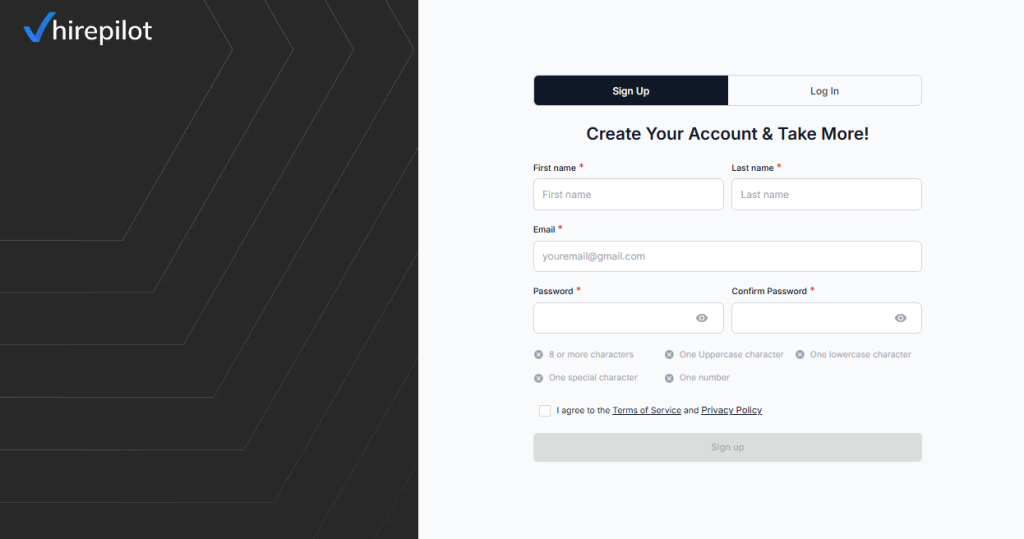
Step 1: Register for a HirePilot Account
First, create your account. This is a quick and simple process that gets you into the system.
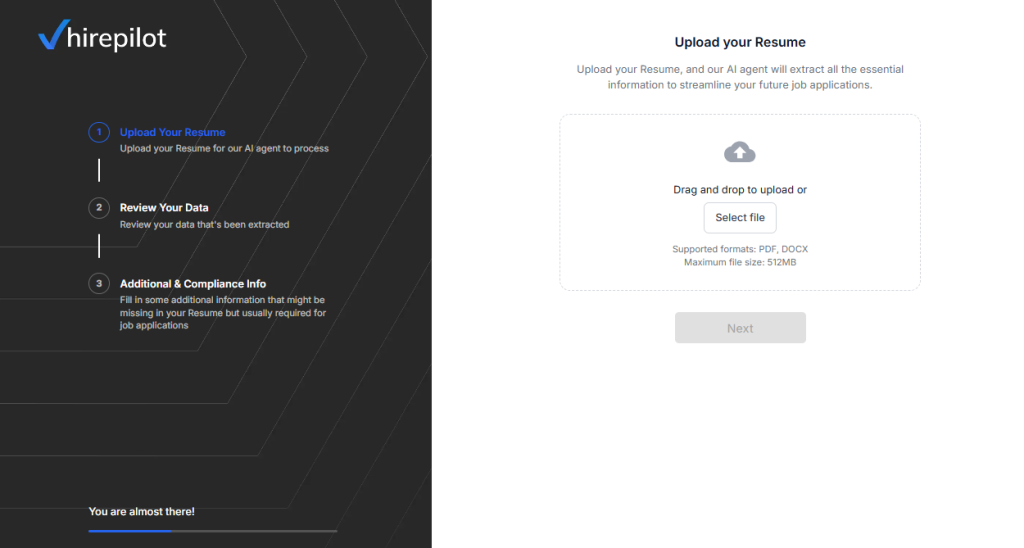
Step 2: Upload your resume for instant profile building
This is where the magic begins. Instead of manually typing everything, just upload your most up-to-date resume. Our resume parsing technology will analyze the document and automatically populate the core sections of your HirePilot profile.
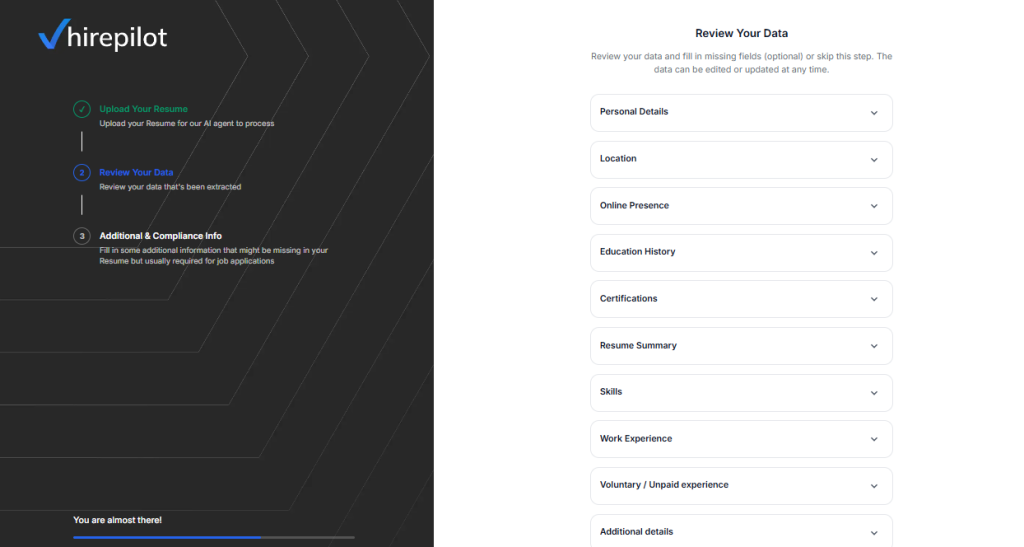
Step 3: Review and enhance your profile
Once your resume is parsed, you’ll be taken to your new profile. Take a moment to meticulously review the information.
- Check that all dates, titles, and company names are correct.
- Flesh out your job descriptions with bullet points that highlight your achievements. Using the STAR method (Situation, Task, Action, Result) is a great way to frame your impact.
- Manually add any information that wasn’t on your resume, such as links to your portfolio, GitHub, or professional certifications.
This profile is now your “single source of truth” for all future applications.
Step 4: Explore your Dashboard
With your profile set, you’ll land on the main HirePilot dashboard. This is where you can track your applications, manage your resumes, and access other powerful job search tools.
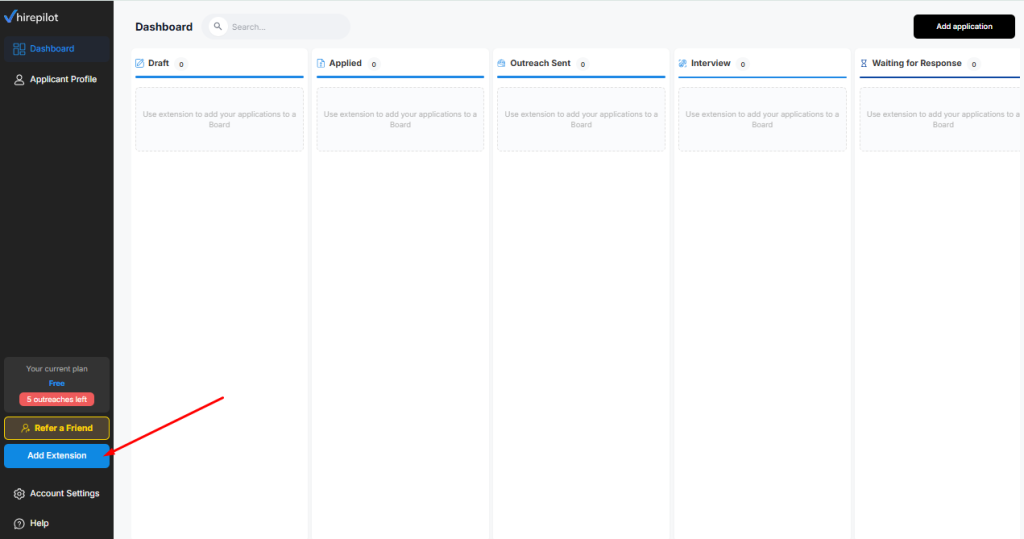
Step 5: Install the HirePilot Browser Extension
To enable the auto-fill feature, you need to install our browser extension.
- Navigate to the official Chrome Web Store or your browser’s extension marketplace.
- Search for “HirePilot.”
- Click “Add to Browser” and confirm the installation.
- Once installed, you’ll see the HirePilot icon in your toolbar. Pin it for easy access.
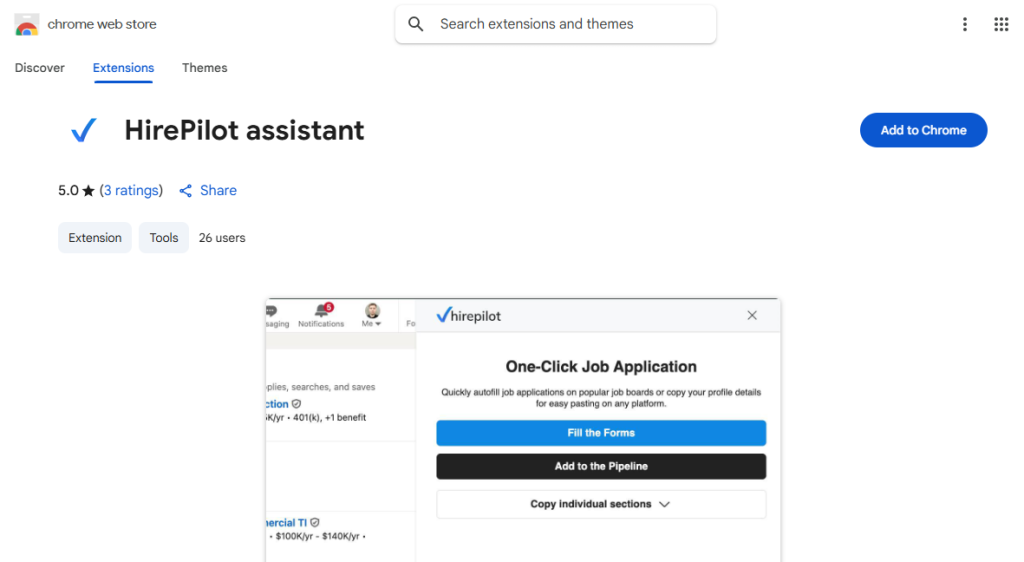
Step 6: Autofill applications on major job platforms
Now you’re ready to apply with lightning speed. Go to a job board or a company’s career page and click “Apply.” When the application form loads, the HirePilot extension will activate.
Click the “Auto-Fill Application” button and watch as the form populates in seconds.
HirePilot works out-of-the-box with all the major Applicant Tracking Systems, including:
- Indeed
- Workday
- Glassdoor
We’re continuously adding support for new platforms—just let us know if you encounter one we haven’t covered yet!
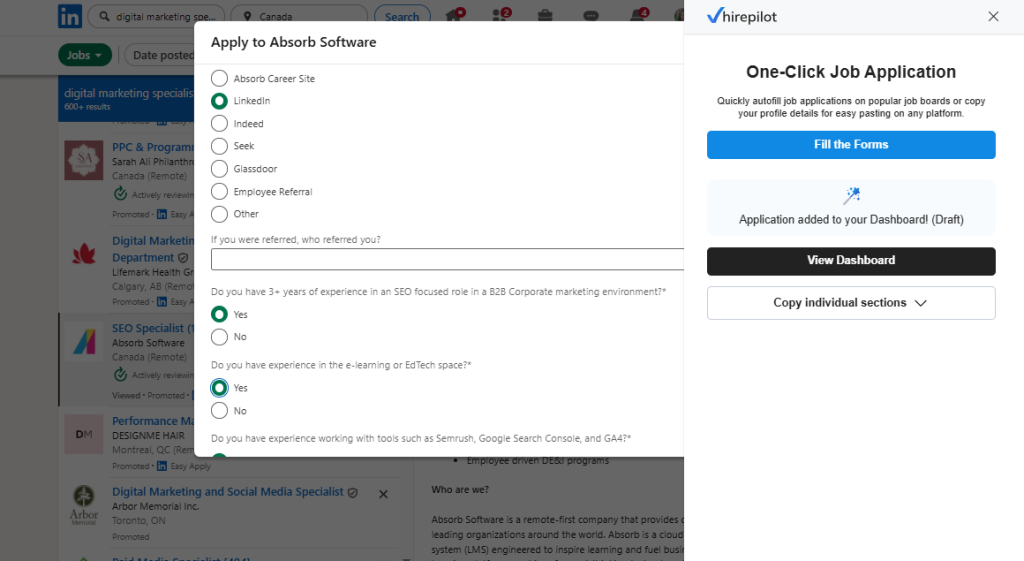
Step 7: Review, tweak, and submit
Automation saves time, but your oversight ensures perfection.
- Scan for accuracy: Quickly review all pre-filled fields.
- Tailor for the role: Make small adjustments to align your auto-filled responsibilities with the specific job description. This is a key part of an effective job search strategy that gets results.
- Handle unique questions: Manually fill in any questions not stored in your profile, like “How did you hear about this position?”
- Submit with confidence: Once you’ve given it a final look, hit submit. Your application will automatically appear in your HirePilot dashboard, ready for you to track and follow up.
Step 8: Track and manage your applications in the dashboard
After submitting, you return to your dashboard, where your application is automatically logged, either under the Applied or Draft tab, depending on its status.
From there, you can:
- Review submission details: See when and where you applied, the job title, and any notes you added.
- Update status: Move applications between Draft, Applied, Interview, Offer, and Closed to keep an overview of your progress.
- Add follow-up reminders: Set a reminder to reconnect with recruiters or send a follow-up email (learn how to do it effectively here).
- Attach documents or notes: Upload your resume version, cover letter, or jot down interview insights directly in the dashboard.
- Analyse your results: Track your application-to-interview rate and identify which types of roles bring you the best response.
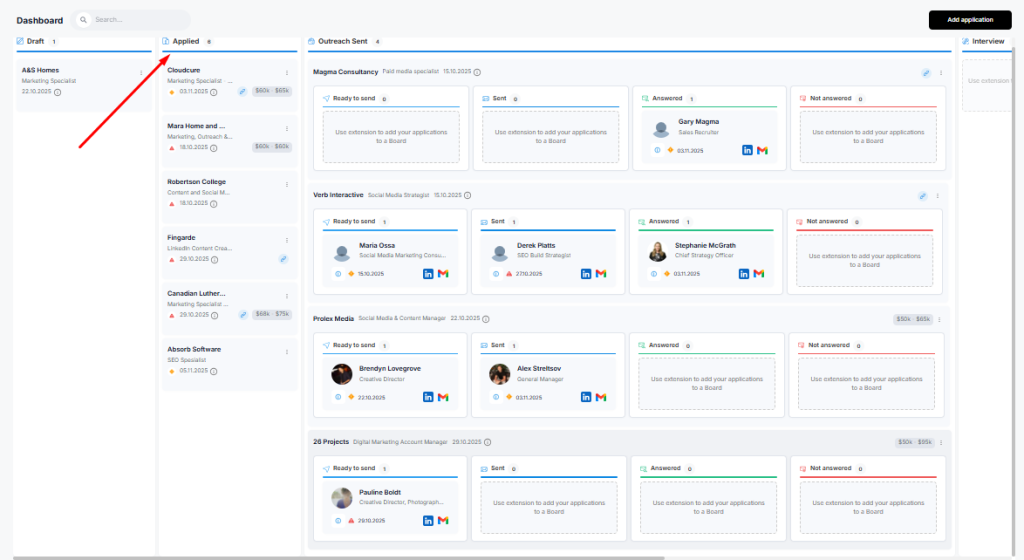
The HirePilot dashboard becomes your personal command centre, helping you stay organised, measure progress, and focus your time on the opportunities that matter most. For a deeper dive, read “Say Goodbye to Chaos: Master Your Search with the HirePilot Job Tracker”.
Best practices for maximizing success
- Keep your profile updated: Whenever you learn a new skill or complete a project, add it to your HirePilot profile immediately.
- Create tailored profile versions: If you’re targeting different roles, create multiple versions of your resume and summary. You can easily switch between them before you autofill applications.
- Always review before submitting: Never blindly trust automation. A final review catches mapping errors and provides an opportunity for customization.
- Combine with other HirePilot tools: Auto-fill is just one piece of the puzzle. Use it together with our AI networking tools and the HirePilot Job Tracker for a comprehensive, organized job search strategy that helps you stay consistent and focused.
Troubleshooting common issues
Issue: The extension didn’t detect the application form.
Solution: Try refreshing the page. Some websites use non-standard frameworks that can be tricky. You can report the site to our support team so we can investigate improving compatibility.
Issue: Some information was mapped to the wrong fields.
Solution: Manually correct the information for that application. This is another reason why the final review step is so important.
Issue: The formatting of my job descriptions looks wrong.
Solution: Some applicant tracking systems strip out formatting like bullet points. It’s a good practice to have a plain text version of your job descriptions saved in your HirePilot profile that uses simple characters like hyphens (-) for lists.
Advanced tips for power users
- Optimize Your “Responsibilities” Content: Pre-write several variations of your key achievements. When you review an auto-filled application, you can quickly swap in the achievement that best matches the job description.
- Use a Text Expander for Custom Questions: For frequently asked questions (e.g., “Why do you want to work here?”), use a text expander tool to save customizable answers and insert them with a short snippet.
- Track Your Metrics: Pay attention to your application-to-interview rate. If you’re sending out many applications but not getting responses, it might be time to revisit your resume content. A data-driven approach is essential for a modern job search.
As TechCrunch reports, even major platforms like LinkedIn are adopting AI to automate job searching and applications, showing that tools like HirePilot Application Auto-Fill are part of a much larger shift toward smart job search automation.
FAQ: HirePilot Application Auto-Fill – Your Ultimate Guide
1. Is my data secure with HirePilot Application Auto-Fill?
Absolutely. We use industry-standard encryption to protect all your data. Your personal information is stored securely in your private account and is only used to populate applications at your command. We are committed to upholding strict data privacy standards, aligning with principles found in regulations like GDPR.
2. Will recruiters know I’m using an auto-fill tool?
No. The end result is a completed application form. There is no indication that a tool was used to fill it out. From the recruiter’s perspective, it looks the same as a manually completed form.
3. Does it work on all job sites?
It works on the vast majority of job boards and company career sites, including major platforms like LinkedIn, Indeed, Glassdoor and Workday. We’re continuously adding support for new platforms, just let us know if you encounter one we haven’t covered yet!
4. Can I use it to apply for jobs in different languages?
Currently, the HirePilot Application Auto-Fill is optimized for English-language applications. However, you can store information in other languages in your profile for manual copying and pasting.
5. Can I edit or delete applications from my dashboard?
Yes. You can easily update the status of any application, add notes, or remove entries from your dashboard at any time. This flexibility helps you keep your job search organized and focused on active opportunities.
6. Does HirePilot integrate with my resume updates automatically?
Yes. Whenever you upload a new version of your resume, HirePilot automatically parses and syncs your data across your profile. You can then choose which version to use for future auto-fill applications, ensuring your most recent experience and skills are always reflected.
Conclusion: Stop typing, start interviewing
The modern job search is a marathon, not a sprint. The HirePilot application auto-fill feature is designed to give you back your most valuable asset: your time. By automating the application process, you reduce manual effort, minimize errors, and free yourself to focus on strategic activities that lead to more interviews and better offers.
You no longer have to choose between quantity and quality. With HirePilot, you can efficiently submit a high volume of accurate applications, dramatically increasing your chances of landing your dream role. It’s time to move beyond endless forms and embrace a smarter, faster way to manage your career.
Ready to revolutionize your job search?
Try HirePilot today and experience the power of effortless applications.