


You have been applying for three weeks. You know you submitted something to that company last Tuesday but you cannot find the email confirmation, you are not sure which resume version you used, and you completely forgot to follow up. Meanwhile the role is probably already filled.
That is not bad luck. That is what a job search without a system looks like from the inside.
Automating your job search does not mean mass-applying to everything and hoping something sticks. It means removing the repetitive admin that eats your time and attention so you can focus on the parts that actually move things forward finding the right roles, reaching the right people, and staying consistent long enough to get results.
What it actually means to automate your job search
Most articles treat automation like a synonym for "apply to more jobs faster." That framing is wrong and often counterproductive.
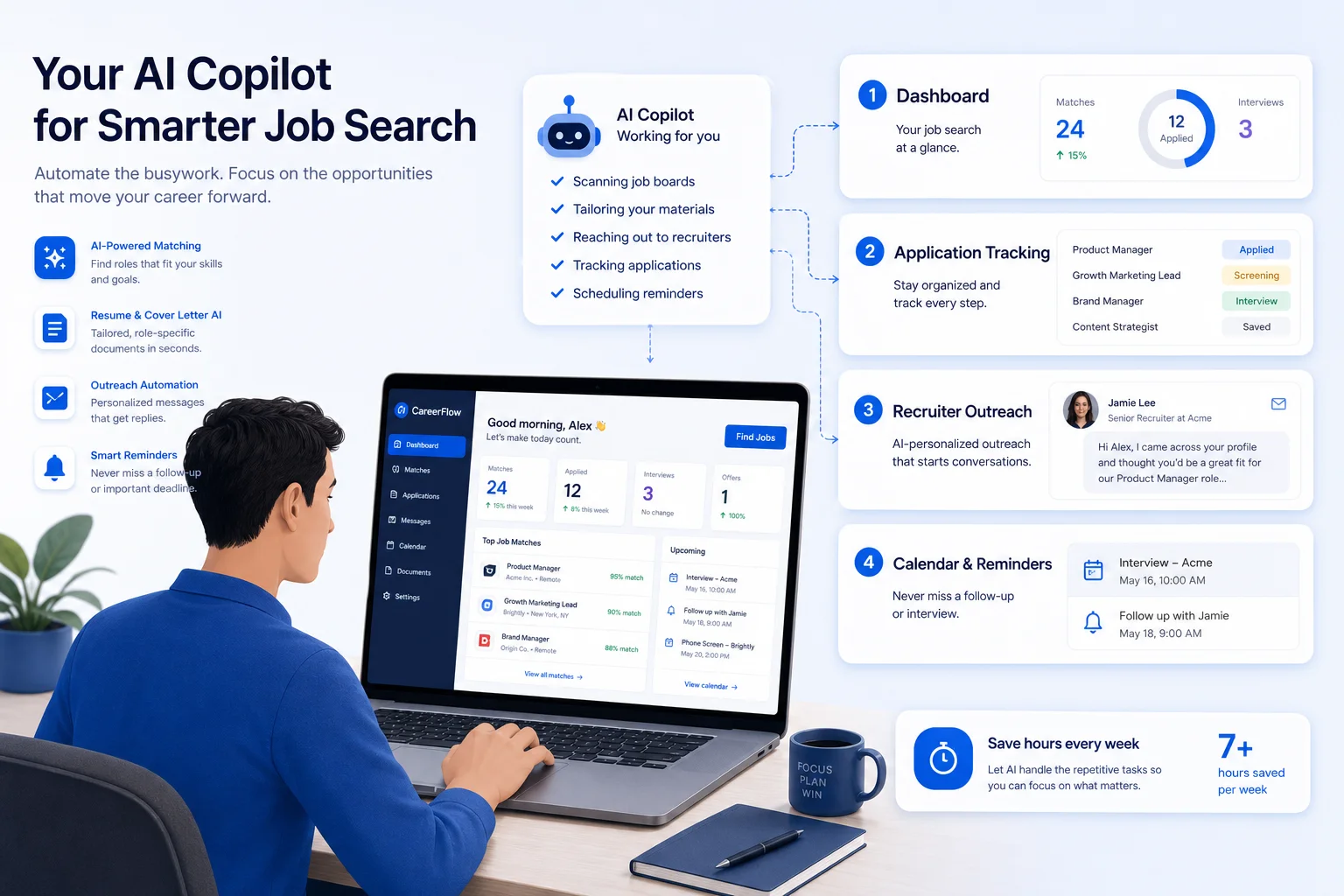
The smarter definition is this: automate the repetitive mechanics, keep the strategic and human parts under your control.
According to the U.S. Bureau of Labor Statistics, the hiring rate dropped to its lowest point since April 2020 despite millions of open positions. The market is not short on opportunities, it is short on candidates who are organized and visible enough to capture them.
That is exactly where automation helps. Not by replacing your judgment, but by handling the parts that drain your energy before you even get to use it.
The part most job seekers get wrong
Before getting into the nine methods, one thing is worth naming directly.
Most candidates treat their job search as a collection of individual applications. Send one, wait, send another. That mental model creates a search that feels random because it is. There is no visibility into what is working, no system for follow-up, and no way to improve over time.
The candidates who automate job search effectively treat it as a pipeline. Every role has a stage. Every stage has a next action. The process runs forward instead of stalling after each submission.
That shift from individual applications to a managed pipeline is what the nine methods below are actually building toward.
"We kept seeing the same pattern across hundreds of job seekers. Qualified people, strong backgrounds, but a search with no structure behind it. The problem was never the resume. It was the process." Viktor Shumylo, co-founder, HirePilot
9 ways to automate your job search
1. Centralize job discovery in one place
When your opportunities are scattered across bookmarks, saved jobs, email alerts, and browser tabs, things slip through the cracks. You forget where you saw a role, apply twice, or miss a deadline because the posting expired in a tab you never went back to.
The first step to automate job search effectively is to centralize discovery. Instead of manually bouncing between platforms every morning, use a system that collects and organizes roles in one dashboard so your energy goes to evaluating opportunities, not finding them again.
Useful filters to set up from the start: job title, location, seniority level, salary range, remote or hybrid preference, industry, and must-have keywords. A cleaner pipeline prevents the random low-quality applying that wastes time and dilutes your focus.
2. Use 1-click autofill for repetitive application forms
One of the biggest time drains in job hunting is retyping the same information into every form. Name, address, work history, LinkedIn URL, portfolio link, sponsorship status, work authorization the list never ends and it is identical every time.
The average job application takes 40 to 50 minutes to complete manually. Autofill brings that down to under five minutes. That difference compounds fast when you are applying to 20 or more roles in a month.
HirePilot's 1-click autofill works across LinkedIn Easy Apply, Indeed, and Workday, handling the repetitive fields automatically so you can review and submit faster. Most candidates are surprised by how much of a Workday or Greenhouse form gets filled in one click and what still needs a human eye before submitting.
What to automate: basic personal details, work history fields, education entries, common screening responses, external links like LinkedIn or portfolio.
What to keep manual: final review, job-specific resume selection, tailored questions requiring nuance, compensation or relocation explanations.
3. Build role-specific resume versions you can reuse
Sending the exact same resume to every job is a mistake. But spending an hour rewriting it from scratch for each application is not sustainable either.
The middle path is a modular resume system with two or three versions built around your main target paths, each one close enough to any role in that category that only minor adjustments are needed.
Automation helps here by storing versions, surfacing the closest match for a given role, and reducing the formatting and admin time that slows the process down. The goal is consistency without repetition.
4. Track every application in a single dashboard
If your tracking system is a spreadsheet plus your inbox plus your memory, your search is harder than it needs to be.
A proper job search pipeline works the same way sales and recruiting pipelines do. Every application moves through clear stages and nothing sits in an undefined state.
| Stage | What to record |
|---|---|
| Saved | Why the role is interesting |
| Applying | Resume version used, deadline |
| Applied | Date submitted, platform used |
| Follow-up due | Recruiter or hiring manager contact, message status |
| Interviewing | Interview dates, prep notes |
| Rejected | Lessons learned, any feedback received |
| Offer | Compensation, deadlines, negotiation notes |
HirePilot logs applications automatically when you apply through the extension, so the tracking happens without a separate manual step. Candidates who treat their search like a pipeline with every stage visible and every next action clear, find that the tracker becomes the difference between momentum and stalling two months in.
Without tracking, even strong candidates lose momentum. Not because of rejection, but because they lose visibility into what is actually happening.
5. Automate reminders for follow-ups and outreach
Most candidates put all their effort into getting applications out and almost none into what happens after. That is where the most opportunity gets left on the table.
Following up strategically improves visibility, especially when paired with direct outreach to the recruiter or hiring manager. But nobody can reliably track every follow-up manually once they are managing 30 or 40 active applications.
Useful reminder triggers to set up: follow up five business days after applying, check in 24 hours after a networking conversation, send a thank-you note after interviews, re-engage if a role is still open after two weeks.
The reminder is automated. The message is still yours.
6. Use AI-assisted messaging for recruiter outreach
Sending the same generic LinkedIn note to every recruiter does not work. But writing every outreach message from scratch is slow and mentally draining after the tenth one.
The smarter approach is AI-assisted drafting, a strong first version generated quickly, then personalized with specific context before sending.
Outreach that gets replies usually includes: the exact role title, one specific reason you are a fit, one relevant result or achievement, a clear and brief ask, and a natural tone that does not sound like a template.
Outreach that actually gets replies usually includes the exact role title, one specific reason you are a fit, one relevant result, a clear ask, and a tone that does not sound like a template. Most candidates who start doing this consistently are surprised by how different the response rate feels compared to applications alone, which is exactly what a step-by-step AI recruiter outreach approach is designed to make repeatable.
| Message element | Example |
|---|---|
| Greeting | Hi Sarah, |
| Context | I just applied for the Senior Customer Success Manager role |
| Credibility | I have 6+ years leading enterprise onboarding and renewal programs |
| Relevance | I noticed your team is expanding post-sales operations for SaaS accounts |
| Ask | I would love to share why I think my background maps closely to this |
| Close | Thanks for your time |
Automation accelerates the draft. It does not replace the human signal.
7. Reach real hiring managers instead of relying only on ATS submissions
This is the gap most articles about job search automation miss entirely. They focus on applying faster, not on getting seen faster.
ATS submission is one path to a hiring manager. Sending a short, relevant message to the right person on the same day you apply is another. Candidates who use both consistently report better response rates than those who rely on the form alone.
A stronger system looks like this: apply through the official channel, identify the likely recruiter or hiring manager, send a brief personalized note, track whether you contacted them, and document any response or next step.
HirePilot supports this workflow by helping candidates find and contact real decision-makers directly. You are no longer just an entry in a database, you are a person who took the time to find the right contact and show genuine interest in a specific role. That shift alone can move you from the pile to a conversation, which is exactly what reaching hiring managers directly with AI makes possible at scale.
"Applying and waiting is a passive strategy in a market that rewards initiative. The candidates we see getting results are the ones who treat outreach as part of the application, not an optional extra step." Viktor Shumylo, co-founder, HirePilot
8. Automate company research and note capture
Research matters, but candidates waste significant time re-reading the same company pages and forgetting what they learned between sessions.
A better system is structured note capture for each target company so the research compounds instead of repeating.
Useful things to record: company mission, product or service category, recent news or funding, hiring signals, team size, interview insights from Glassdoor or similar, outreach contacts, and why the role is interesting to you specifically.
This improves both the application and the interview. It also prevents the awkward moment of forgetting why you applied to a company in the first place.
9. Review your pipeline weekly and optimize based on what you see
Automation is not only about moving faster. It is also about seeing what your process is producing.
A weekly pipeline review is what turns job search activity into job search strategy.
Useful things to review: number of roles saved, applications submitted, reply rate, interview conversion rate, source of best opportunities, response rate by resume version, response rate by outreach timing, follow-ups completed.
According to LinkedIn's Global Talent Trends data, application volume per role has increased significantly while hiring rates have slowed. In that environment, optimizing your process based on real data matters more than increasing volume.
If LinkedIn applications get views but no replies, company-site applications convert better, or one resume version gets more screenings, you can adjust quickly. That is how you automate job search intelligently rather than blindly.
What to automate vs. what to keep human
The concern most candidates have is that automation will make them look generic or easy to ignore. That concern is valid if automation is applied to the wrong parts.
The answer is not automate everything. It is automate selectively.
| Automate | Keep human |
|---|---|
| Job aggregation and discovery | Role prioritization |
| Repetitive form filling | Final application review |
| Reminder scheduling | Nuanced screening answers |
| Message drafting | Final personalization before sending |
| Status tracking | Interview conversations |
| Note organization | Networking relationship-building |
| Pipeline analytics | Deciding where to focus effort |
This balance is where the best results happen. Speed on the admin side, judgment on the strategy side.
A better workflow across LinkedIn, Indeed, Workday and company sites
Most candidates are not using one platform, they are using all of them. That is why disconnected tools create friction that compounds over time.
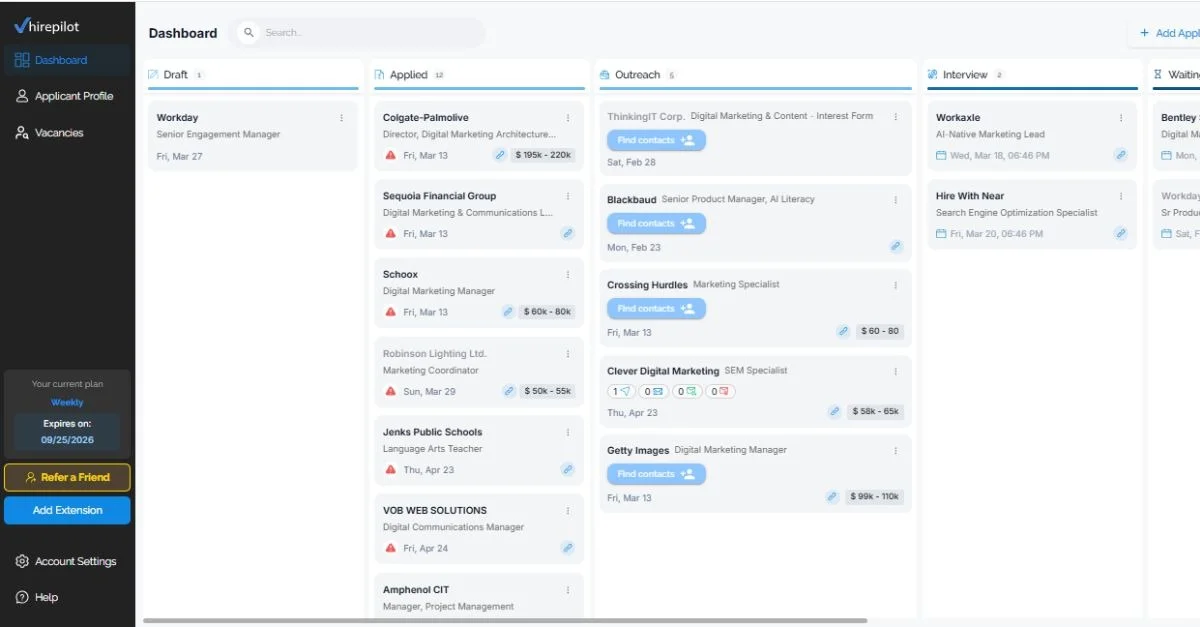
A practical workflow that holds together across platforms:
Discover roles across LinkedIn, Indeed, Workday and company career pages. Save promising roles into one centralized dashboard. Prioritize by fit, urgency, and compensation. Use autofill to complete repetitive application steps. Attach the right resume version. Log the application automatically. Schedule a follow-up reminder. Identify recruiter or hiring manager contacts. Send a personalized outreach message. Track responses, notes, and next actions.
That is the difference between random applying and a controlled pipeline.
Why automating your job search reduces burnout
The emotional cost of job searching is almost never talked about. But burnout in a long search is not just about rejection. It is about chaos.
Chaos looks like: losing track of applications, forgetting who you messaged, rewriting the same answers constantly, not knowing what is working, and feeling busy without real momentum.
Automation helps because it replaces chaos with structure. Less mental load, more consistency, fewer dropped balls, better follow-through, and more energy left for the parts that matter — networking, interview prep, and direct outreach.
HirePilot is built around this reality. It is not just an autofill tool or just a tracker. It brings job discovery, autofill, automatic tracking, reminders, and AI-assisted hiring manager outreach into one workflow so the search becomes more focused and less exhausting to sustain.
How HirePilot fits into a smarter job search
HirePilot is designed for active job seekers who want to automate the right parts of the process without losing control or personalization.
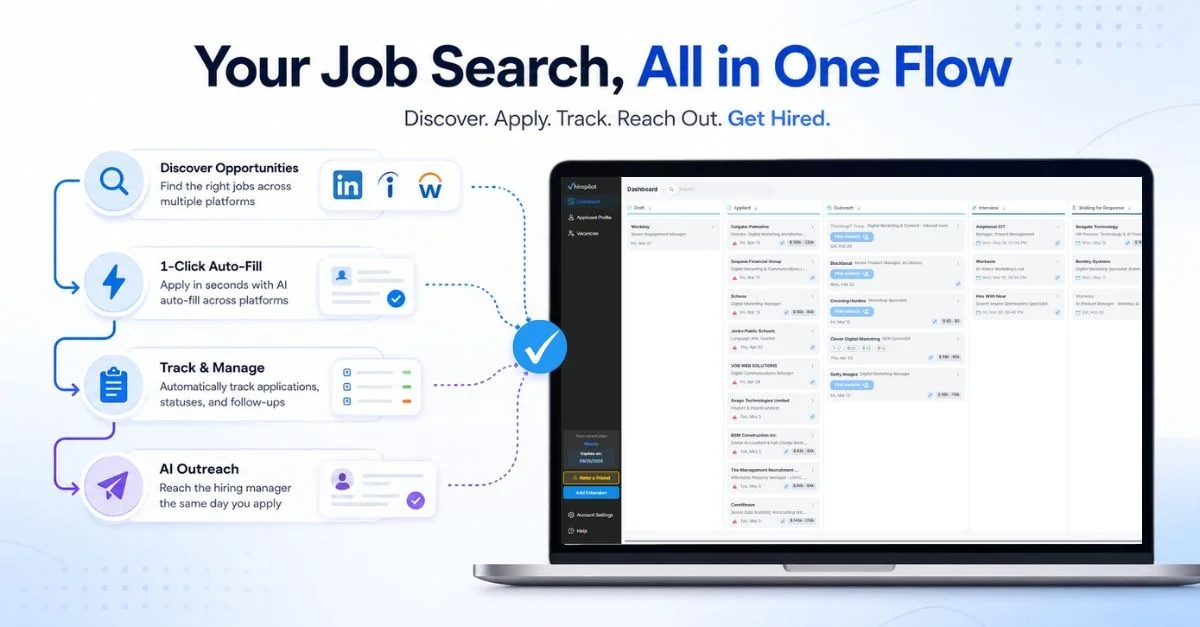
In one workflow: centralized job discovery, 1-click autofill across LinkedIn, Indeed, and Workday, automatic application tracking, status management and reminders, and AI-assisted outreach to reach the hiring manager the same day you apply.
The outreach feature is what separates it from a standard autofill tool. Most tools help you fill forms faster. HirePilot also helps you get in front of the person behind the form, which is where the actual hiring decision happens.
If your search feels busy but not productive, the infrastructure is almost always what needs to change first.
FAQ: Automate job search: 9 smart ways to save time
How do you automate your job search?
You automate your job search by using tools that handle repetitive tasks like job discovery, application autofill, tracking, reminders, and outreach drafting. The best approach is to automate admin work while keeping final review and personalization under your control.
What parts of the job search should not be automated?
The parts that require genuine judgment and human connection should stay manual: deciding which roles are actually a good fit, writing the final version of personalized outreach, answering nuanced screening questions, and any conversation with a recruiter or hiring manager. Automation handles the repetitive mechanics around these moments, not the moments themselves.
Does automating job applications hurt your chances?
Only if it leads to generic, untailored submissions. Automation that handles form-filling and tracking while keeping your resume selection and outreach personalized does not hurt your chances, it improves them by freeing up time for the parts that matter most.
How long does a typical job search take?
Most active job seekers spend three to six months searching. Candidates who apply early to fresh postings, track consistently, and follow up directly with hiring managers tend to shorten that timeline meaningfully.
What is the difference between automating job search and mass applying?
Mass applying means submitting to every available role with minimal targeting or personalization. Automating job search means removing repetitive admin from a targeted, organized process. The first increases volume without improving quality. The second increases efficiency while maintaining or improving quality.
Can you automate outreach to hiring managers?
You can automate the drafting and scheduling of outreach messages, but the final personalization should always be human. A message that references something specific about the role or company converts significantly better than a template. Tools like HirePilot help generate the first draft, the context and personal touch are still yours to add.
Find your next job faster - without the chaos
Spend minutes, not hours, on applications. Stay organized, follow up confidently, and get noticed sooner.
Share this article

Viktor Shumylo
Viktor Shumylo is the co-founder of HirePilot, an AI-powered job search platform. He has 10+ years of experience building SaaS products and tools that help job seekers optimize resumes, streamline applications, and land interviews faster.
More articles by Viktor Shumylo