

How to automate job applications for PhDs applying to academic and industry roles

July 25, 2026
Automating job applications means using browser-extension autofill, a centralized tracking dashboard, and targeted outreach tools to submit applications at volume without manually retyping your credentials each time.
The academic and industry job markets demand very different application formats. Academic roles require tailored research statements, teaching portfolios, and letters of reference coordination. Industry roles want ATS-optimized resumes, skills-matched cover letters, and direct recruiter contact. A researcher running both tracks simultaneously can end up submitting far more applications than manual entry can sustain.
This guide covers how to choose the right automation software, how to set up a secure multi-CV workflow step by step, how to keep personalization intact at scale, and how HirePilot's autofill, tracker, and outreach features work together as a single answer to both the form-filling problem and the getting-in-front-of-the-right-person problem.
What are the best automatic job application software tools for PhDs?
The best automatic job application software tools for PhDs combine browser-extension autofill, a centralized submission dashboard, and recruiter outreach in one platform. Standalone autofill extensions that only fill forms leave you with no record of where you applied or any way to follow up, which is a critical gap when managing 100-plus applications across academic and industry pipelines.
The table below ranks four commonly used tools across the criteria that matter most for high-volume PhD job searches:
| Tool | Autofill accuracy | Privacy approach | Outreach/contact finder | Tracking dashboard | Best for |
|---|---|---|---|---|---|
| HirePilot | High, handles Workday, LinkedIn, Indeed including screening questions | Data stored in your own account, not sold to third parties | Yes, built-in hiring manager finder plus AI personalized message | Kanban board, auto-saves on autofill | Job seekers who want to automate autofill on LinkedIn, Indeed, and Workday, track applications in one dashboard, and find decision-makers to send personalized outreach |
| Simplify | Broadly supports most major ATS platforms, strongest on Greenhouse and Lever, weaker on Workday and enterprise systems | Server-side profile storage on Simplify's own servers | No automated hiring-manager finder. | Yes, included free, dashboard of submitted applications | Job seekers who want autofill for application forms |
| Huntr | High, works across thousands of sites, includes major ATS platforms | Standard Chrome extension data disclosure, no distinct privacy claim confirmed | No automated hiring-manager finder. | Full Kanban-style tracker plus interview tracker and job search metrics | Job seekers who want resume building, AI tailoring, and tracking bundled together |
| Teal | Limited, paid add-on not included in free plan, works only on select applications. | Standard Chrome extension data disclosure, no distinct privacy claim confirmed | No automated hiring-manager finder. | Job Search CRM with goal tracking, salary insights, and follow-up reminders | Job seekers who mainly want tracking and resume tools |
| LinkedIn Easy Apply | Moderate, LinkedIn-native only | LinkedIn data policies apply | No | No native tracker | Job seekers who want to apply quickly through LinkedIn Easy Apply |
| Manual spreadsheet plus copy-paste | None | Full user control | No | User-built | Low-volume, high-customization only |
HirePilot stands out because autofill and job tracking work together as a single action. Every time the extension autofills a form, the application is automatically saved to your Kanban tracker. No manual logging is required.
How do PhDs apply to academic and industry jobs at scale?
PhDs apply to academic and industry jobs at scale by separating their documents into role-specific CV and cover letter variants, using autofill software to eliminate repetitive data entry, and running parallel outreach to hiring managers or faculty search committee contacts while applications are in transit. Doing this manually across two tracks at once is what makes automation worth the setup time.
The academic track and the industry track each have distinct friction points. Academic applications often route through institutional portals (Interfolio, MathJobs, AcademicJobsOnline) that autofill tools may not reach, so those require a manual submission layer. Industry applications concentrate on LinkedIn Easy Apply, Indeed, and Workday, all of which HirePilot's extension handles with high accuracy, including the multi-page screening questions that trip up simpler autofill tools.
The practical approach is a two-lane workflow. Lane one is autofill-eligible industry roles submitted through HirePilot at volume. Lane two is academic roles submitted manually but tracked in the same HirePilot Kanban board by adding them as custom cards. Both lanes feed into one dashboard so nothing falls through the cracks.
How to compare application automation software for bulk academic versus targeted industry roles
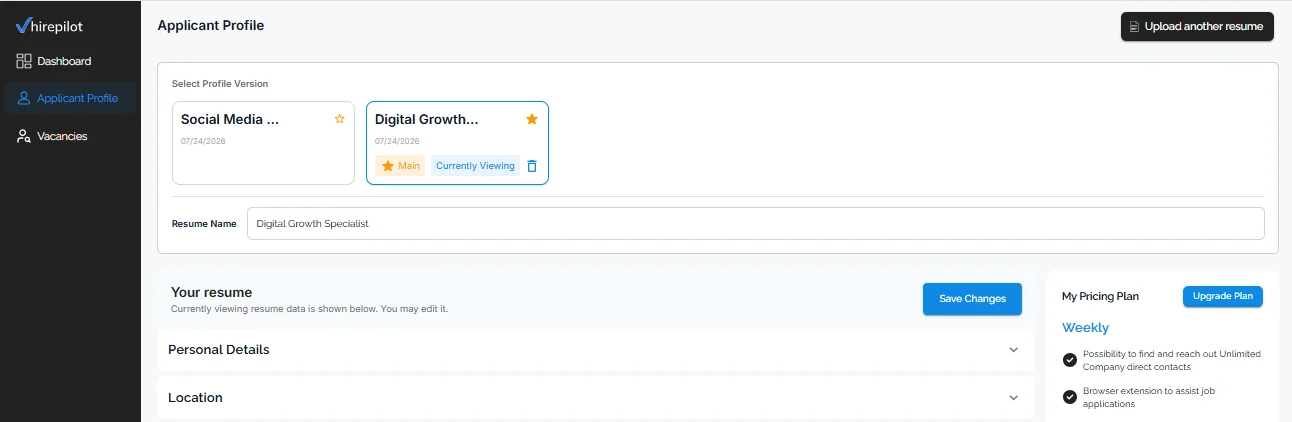
Autofill accuracy is the most visible criterion. Tools that only fill name, email, and phone are low-value for PhD applications, which involve work history that spans labs, grants, publications, and postdoc positions. HirePilot's autofill handles extended work history, custom screening questions, and dropdown fields on Workday, used by "more than 65% of the Fortune 500", according to Workday's own newsroom.
Customizable templates matter because a single resume rarely serves both an academic and an industry application. You can upload a long-form academic CV and a shorter industry resume separately, then attach the correct one before autofilling each role.
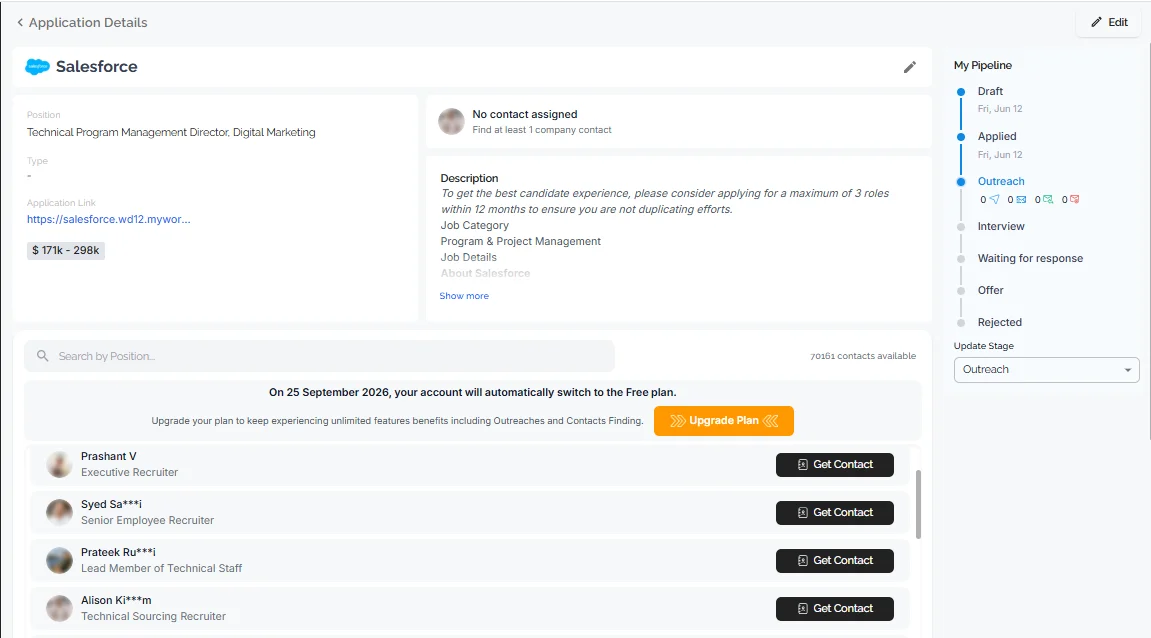
Outreach and contact finder is the feature that separates form-filling tools from full job search tools. Submitting an application without following up leaves the outcome entirely to ATS ranking. HirePilot's Recruiter Outreach feature finds the hiring manager's name and sends a personalized AI-drafted message on the same day as the application.
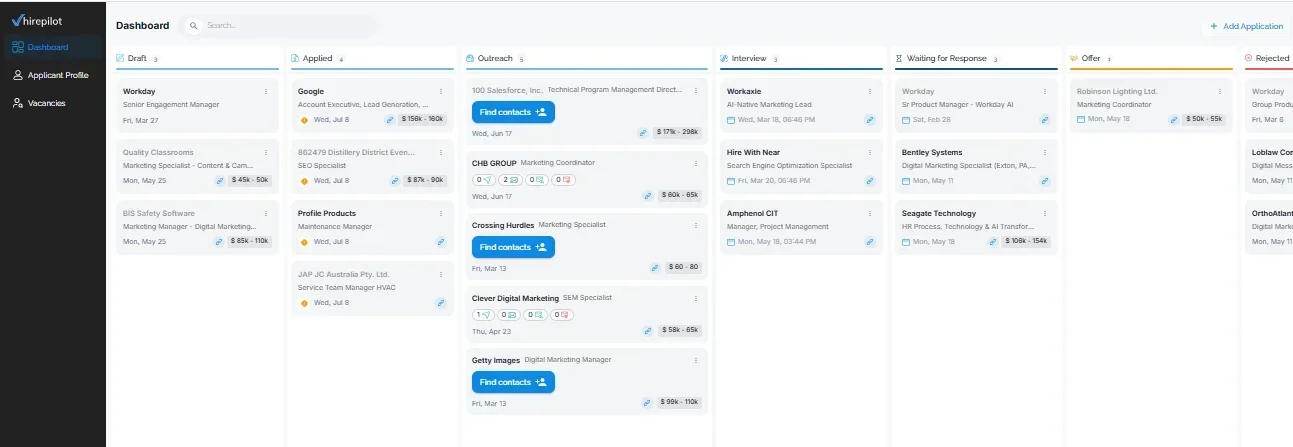
Tracking analytics close the feedback loop. A dashboard showing application stage and days since submission lets you see at a glance where each application stands so you can plan follow-ups accordingly.
Privacy is a legitimate concern for researchers who store confidential research descriptions or unpublished work in their cover letters. HirePilot stores data in encrypted databases and does not sell profile data to third parties. The HirePilot privacy policy provides the full technical and legal detail.
How do I automate job applications without losing personalization?
Automating job applications without losing personalization requires separating the parts of an application that should be identical across every submission (contact details, work history dates, degree information) from the parts that must be tailored (the opening paragraph of the cover letter, the research statement summary, the reason-for-applying sentence). Autofill handles the first category completely. The second category requires a template system with fill-in variables.
The common mistake is treating automation as all-or-nothing. Researchers who automate everything produce cover letters that read like mail merge outputs, which search committee members and industry recruiters identify immediately. Researchers who automate nothing spend significantly longer on each application and burn out before reaching competitive volumes.
The correct approach is a three-tier document strategy:
- Tier 1 (fully automated): Contact information, education history, work history, skills list. These fields are identical across every application and are handled entirely by autofill.
- Tier 2 (template with one variable): The cover letter body, where a single sentence names the specific lab, company, or research focus. Changing one sentence takes 90 seconds and transforms a generic letter into a targeted one.
- Tier 3 (fully manual): Research statements, teaching philosophies, and writing samples for academic roles. These are uploaded once per application type and reused with minor edits.
HirePilot's autofill extension fills Tier 1 fields across LinkedIn Easy Apply, Indeed, and Workday forms. You can upload up to two resume versions, each parsed into its own profile, and choose which one autofills each application directly from the extension at the moment you apply, so the personalization layer is always one edited sentence away, not a rewrite from scratch.
Step-by-step setup: how to automate job applications with HirePilot
Setting up HirePilot takes about 15 minutes and does not require any coding or technical background. The process starts with your resume, not a manual data entry form, and results in a live profile, an installed extension, and an active outreach tool by the end.
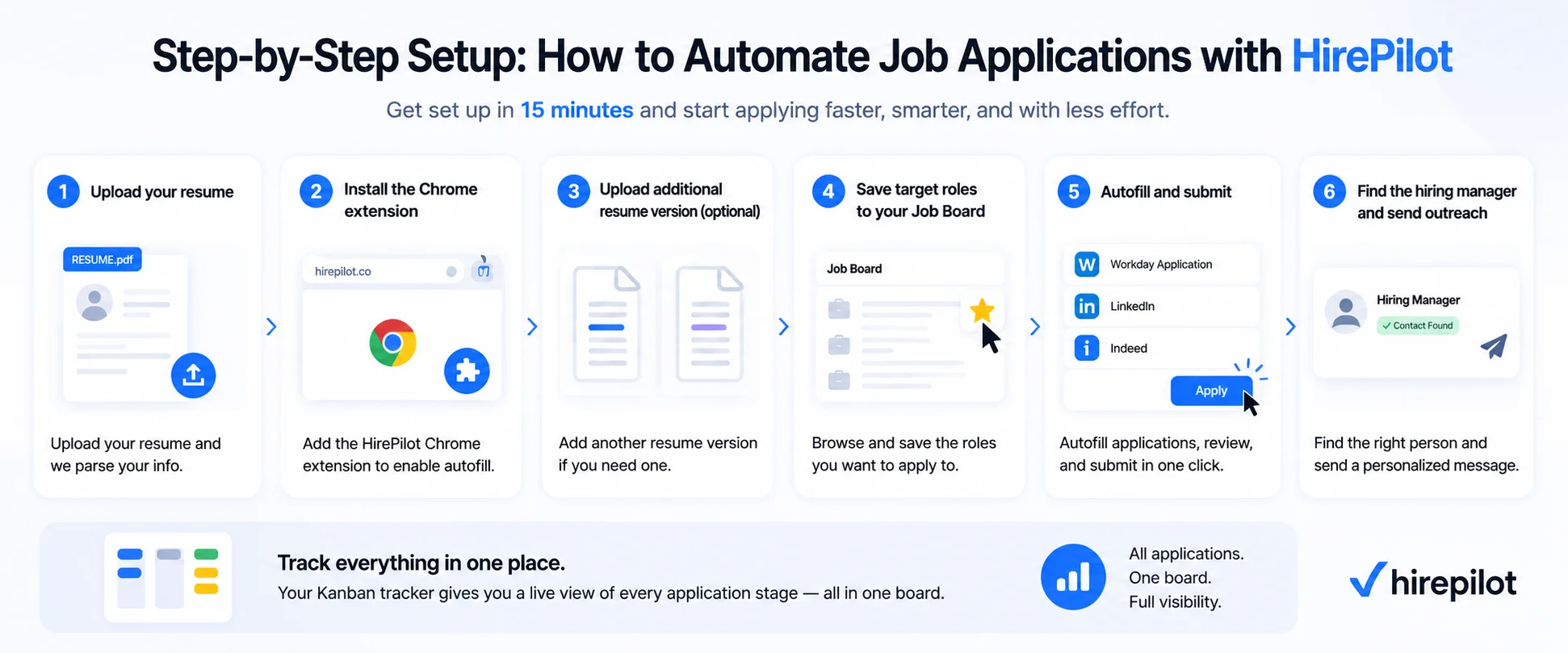
Step 1: Register and upload your resume.
Create your account and upload your resume. HirePilot automatically parses your work history, education, and skills from the file. Review the parsed fields and correct anything the parser missed or misread, for example an unusual job title or a publication listed as an employer. This becomes the data source autofill will use later.
Step 2: Install the Chrome extension during onboarding.
Onboarding prompts you to install the HirePilot Chrome extension. This is the autofill engine. It connects directly to the profile data you just built in step 1.
Step 3: Upload additional resume version if you need one .
If you are applying to both academic and industry roles, upload a second resume version, for example a long-form academic CV alongside a shorter industry-style resume. Both are stored in your account and available to attach when you apply.
Step 4: Save target roles to your Job Board.
Browse or search the Job Board and mark roles you want to apply to as favorites. This keeps your target list in one place instead of scattered across browser tabs or a spreadsheet.
Step 5: Autofill and submit.
Open a saved role's application form and click the HirePilot extension. It autofills the form from your profile data across LinkedIn Easy Apply, Indeed, and Workday, including multi-page screening questions. Review the fields, attach the correct resume version if you have more than one, and submit. The application saves to your Kanban tracker automatically the moment you submit. If a portal is not compatible with autofill, for example an institutional academic system, you can add that application to the tracker manually so it stays in the same pipeline.
Step 6: Find the hiring manager and send outreach.
From the tracker, use Recruiter Outreach on the same role. It identifies the hiring manager or relevant decision-maker and drafts a personalized message. Review and send it the same day you apply, so the application and the direct contact happen together.
Your Kanban tracker gives you a live view of every application's stage at any point, academic and industry roles together on the same board.
Can autofill and outreach work together in one workflow?
Autofill and outreach can and should work together in a single workflow, because submitting a form and contacting the hiring manager directly are two separate actions that both move the application forward. Response speed carries real weight in hiring decisions: research published in Management Science found that hiring evaluators consistently favor candidates who reply quickly, often more than they consciously realize. The same research found that messages perceived as automated lose this advantage entirely, which is why HirePilot has you review and personalize every AI-drafted message before it sends rather than firing it off untouched.
That same logic applies to reaching out to the hiring manager after you apply. Sending that message within 24 to 48 hours keeps your application fresh in their mind while the role is still top of mind for them too. The message has to read as genuinely personalized, not templated, which is exactly what HirePilot's Recruiter Outreach does: it connects your specific background to the actual person or company the message is going to, rather than sending the same generic note to every hiring manager.
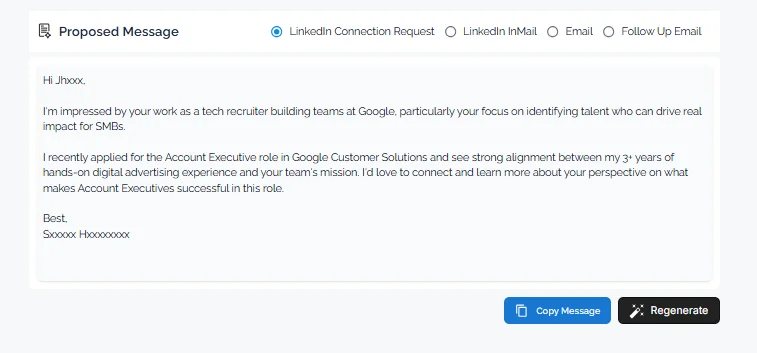
HirePilot is built specifically around this combined workflow. After the extension autofills and submits an application, the same dashboard surfaces the Recruiter Outreach tool, which identifies the hiring manager for that specific role and drafts a personalized message, whether that's a LinkedIn message, a LinkedIn InMail, an email, or a follow-up, using AI.
For industry roles, the hiring manager is usually a team lead, engineering manager, or department head whose LinkedIn profile can be found within the outreach tool. For academic roles, the search committee chair is often named in the job posting.
How many job applications can you automate per day safely?
There is no universal safe number, but two things matter more than the count itself: whether a human is actively reviewing each submission, and whether personalization keeps pace with volume.
The first dimension is platform safety. Most job boards allow automated form-filling via browser extensions because the user is still present and reviewing each submission. Fully robotic no-review mass application tools that submit without any human confirmation cross into terms-of-service gray areas. HirePilot's autofill requires the user to be present and click submit, which keeps the process compliant.
The second dimension is quality safety. Submitting a high volume of applications with no personalization and no tracking produces a worse outcome than submitting fewer applications with tailored cover letter sentences and same-day outreach. The practical ceiling is whichever pace still lets you personalize each Tier 2 sentence and send outreach the same day, rather than a fixed number.
For PhDs running both academic and industry tracks, industry applications can move faster since autofill handles most of the form, while academic applications take longer given the manual portal work most institutions still require.
What is the non-obvious reason autofill alone fails PhD job seekers?
Autofill alone fails PhD job seekers because academic and industry hiring decisions are rarely made purely on application materials. The form submission enters a pipeline; the hiring manager's inbox does not. A PhD applying to a biotech company that uses Workday may have a perfectly autofilled application sitting in a large queue of submissions with no human ever reading it until a recruiter filters by keyword. Autofill solves the friction of entering data. It does not solve the problem of visibility.
The non-obvious insight is that the application form and the hiring manager's attention are two completely different targets, and most job seekers treat them as the same target. Researchers with strong publication records and competitive credentials routinely receive no response from industry applications because their profile never surfaced above the ATS keyword filter. The researchers who do get responses at scale are the ones who pair each submission with a direct outreach message.
This is precisely why HirePilot pairs autofill with a recruiter outreach tool in the same platform. The two tools address two distinct problems in sequence. Finding the hiring manager for any role and sending a personalized message on the same day as the application converts the application from a passive document in a queue into an active conversation.
"Most job seekers think their problem is that they are not applying to enough roles. The real problem is usually that the right people never saw their applications at all. Volume matters, but visibility matters more." Viktor Shumylo, co-founder, HirePilot
PhD and STEM researchers face a genuine volume problem: competitive academic and industry markets require far more applications than manual submission can sustain alongside research, teaching, and dissertation obligations. The answer is not to choose between speed and personalization. The answer is to automate what should be identical (form fields, work history, credentials) and protect what must be human (the single sentence that connects your work to this specific role or lab). HirePilot's autofill handles the repetitive parts of the form, the tracker saves each autofilled submission automatically, and the outreach tool helps get your application in front of the right person the same day. Start your search at HirePilot.
FAQ
How do I automate job applications without losing personalization?
Automate job applications without losing personalization by separating static information (contact details, work history, education) from dynamic information (the role-specific opening sentence in your cover letter). Use autofill software to handle static fields automatically, then spend 90 seconds editing one personalized sentence before submitting. HirePilot supports up to two resume versions, letting you choose and edit the correct one before each submission.
What are the best automatic job application software tools for high-volume searches?
The best automatic job application software tools combine browser-extension autofill with a centralized tracking dashboard and a recruiter outreach feature. HirePilot covers all three functions in one platform and handles Workday, LinkedIn Easy Apply, and Indeed including screening questions. Tools like Simplify cover autofill and tracking.
How do PhDs apply to academic and industry jobs at scale without burning out?
PhDs apply to academic and industry jobs at scale by running two parallel lanes: an autofill-eligible industry lane using tools like HirePilot for Workday, LinkedIn, and Indeed applications, and a manual-upload academic lane for institutional portals, with both lanes tracked in the same dashboard. Batching by role type and pacing sessions to match your personalization capacity prevents quality degradation and reduces cognitive fatigue.
Can autofill and outreach work together in one workflow?
Autofill and outreach work together in one workflow within HirePilot. After the extension autofills and submits an application, the dashboard surfaces the Recruiter Outreach tool for that same role, which identifies the hiring manager and generates a personalized AI-drafted message you review before sending. This creates two entry points into the hiring process rather than one.
How many job applications can you automate per day safely?
There is no fixed safe number. What matters is staying present to review each submission and keeping personalization and outreach paced with your volume, rather than maximizing raw application count.
Find your next job faster - without the chaos
Spend minutes, not hours, on applications. Stay organized, follow up confidently, and get noticed sooner.
Share this article

Viktor Shumylo
Viktor Shumylo is the co-founder of HirePilot, an AI-powered job search platform. He has 10+ years of experience building SaaS products and tools that help job seekers optimize resumes, streamline applications, and land interviews faster.
More articles by Viktor Shumylo