

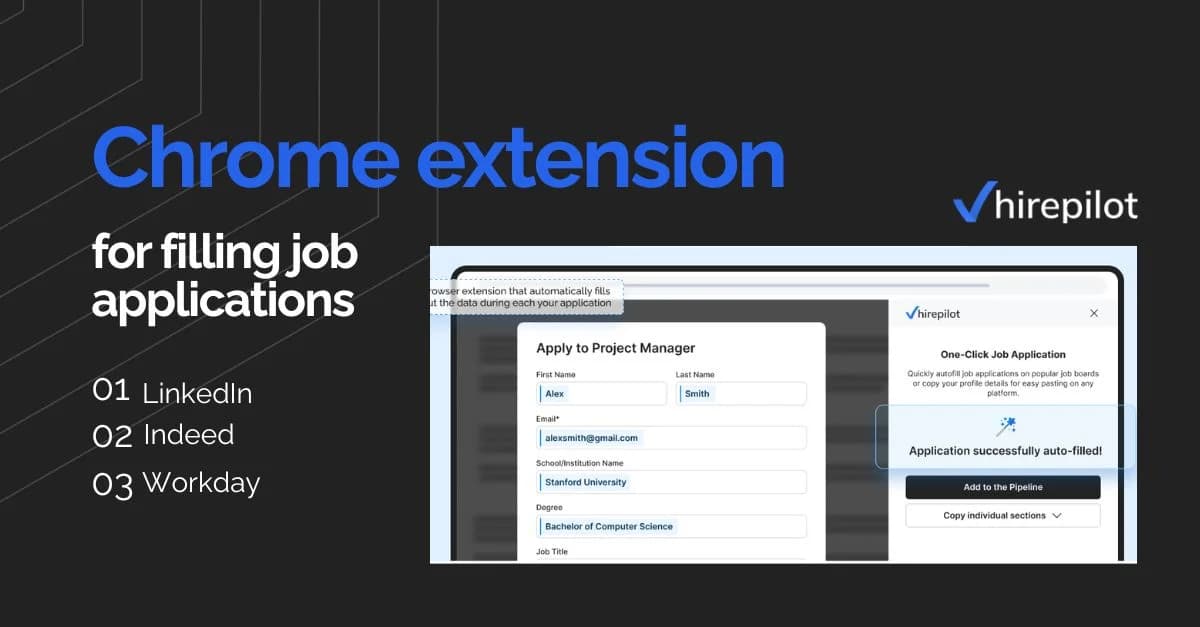
Chrome extension for filling job applications on LinkedIn, Indeed, and Workday

July 20, 2026
You open LinkedIn, find a role that fits, click Easy Apply, and spend seven minutes retyping your phone number, your graduation year, your years of experience, and your preferred work authorization status. You submit. Then you open Indeed, find another promising listing, and type all of it again. Then you land on a Workday portal and realize the form is three pages long, with custom fields that do not map to anything on your resume. By the time you have applied to five jobs, an hour is gone and you have nothing to show for it except a sore wrist and a growing sense that the process is designed to exhaust you.
This is exactly why chrome extensions for filling job applications exist. Job seekers who apply to a meaningful number of positions each week can spend more time filling out redundant form fields than they spend reading actual job descriptions. The repetition is not just tedious, it introduces errors. You mistype a digit in your salary expectation. You accidentally leave a required field blank. You submit before attaching the right resume version. Every mistake is a small but real risk to your candidacy.
HirePilot built a Chrome extension specifically to solve this problem. It fills job application forms on LinkedIn Easy Apply, Indeed, and Workday using your stored profile, logs each application automatically in a built-in job tracker, and lets you apply to more roles in less time without losing any of the precision that a careful job search requires.
What the HirePilot Chrome extension does
The HirePilot extension is a browser tool that reads open application forms and populates the fields with information you have entered once into your HirePilot profile. The extension works across three major platforms: LinkedIn Easy Apply, Indeed, and Workday. Each platform handles applications differently, and the extension adapts to each one.
Beyond filling forms, the extension automatically saves each application to your HirePilot job tracker the moment you submit. This matters more than it sounds. Most job seekers who apply in volume lose track of where they applied, when they applied, and what version of their resume they used. The tracker solves that without requiring any manual logging.
The autofill and tracker features work together by design. If you fill a form without logging it, you cannot follow up intelligently. If you log without filling, you still lose the time. HirePilot treats them as a single workflow, not two separate tools.
How to install the extension
Setting up HirePilot starts on the website. Sign up with your email, then upload your resume. HirePilot parses it automatically and builds your profile from it, so you do not need to fill in every field by hand. Review the parsed details and correct anything that needs it.
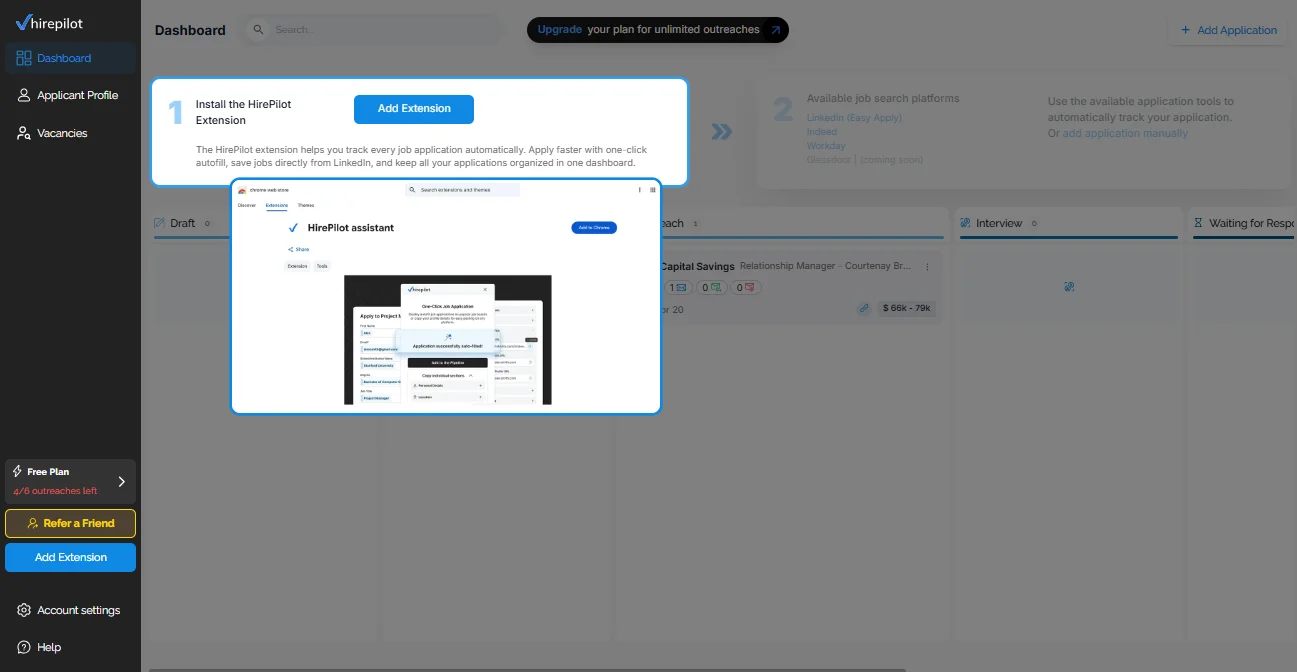
From there, you land on the job board, where onboarding walks you through installing the extension. Add HirePilot assistant to your browser when prompted, then return to the HirePilot tab to finish the remaining onboarding steps.
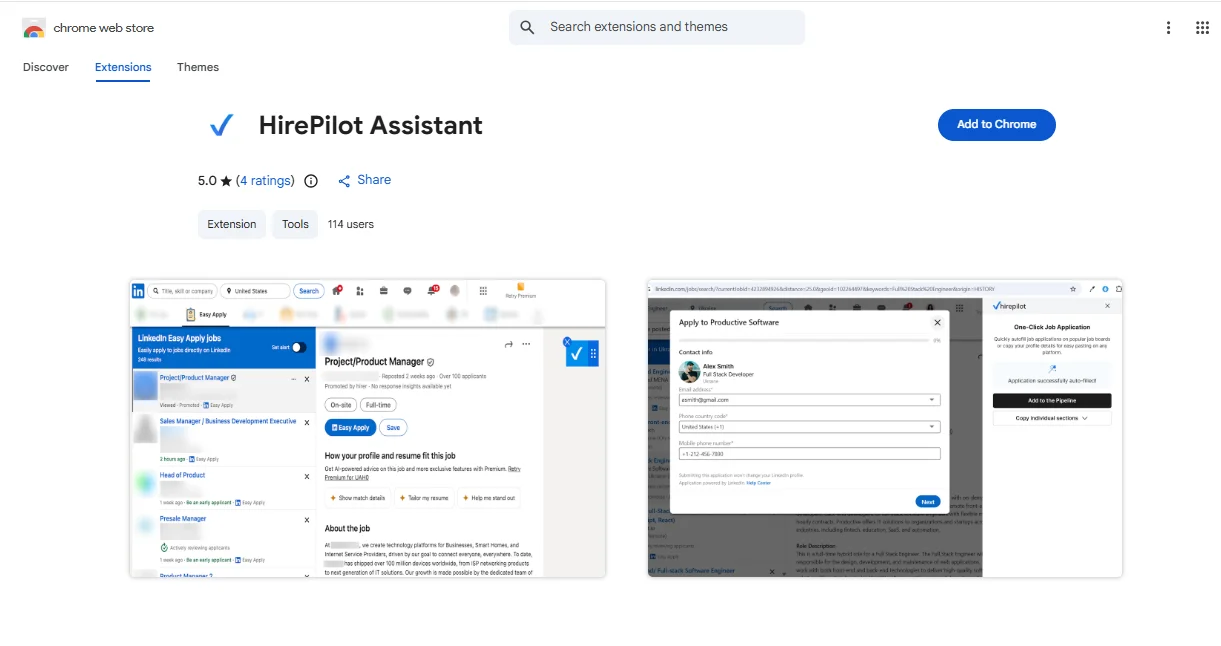
Once onboarding is done, you land back on the job board and can start applying. Open a role on LinkedIn, Indeed, or a Workday employer portal, and the extension fills the form using the profile you already set up.
How it works on LinkedIn Easy Apply
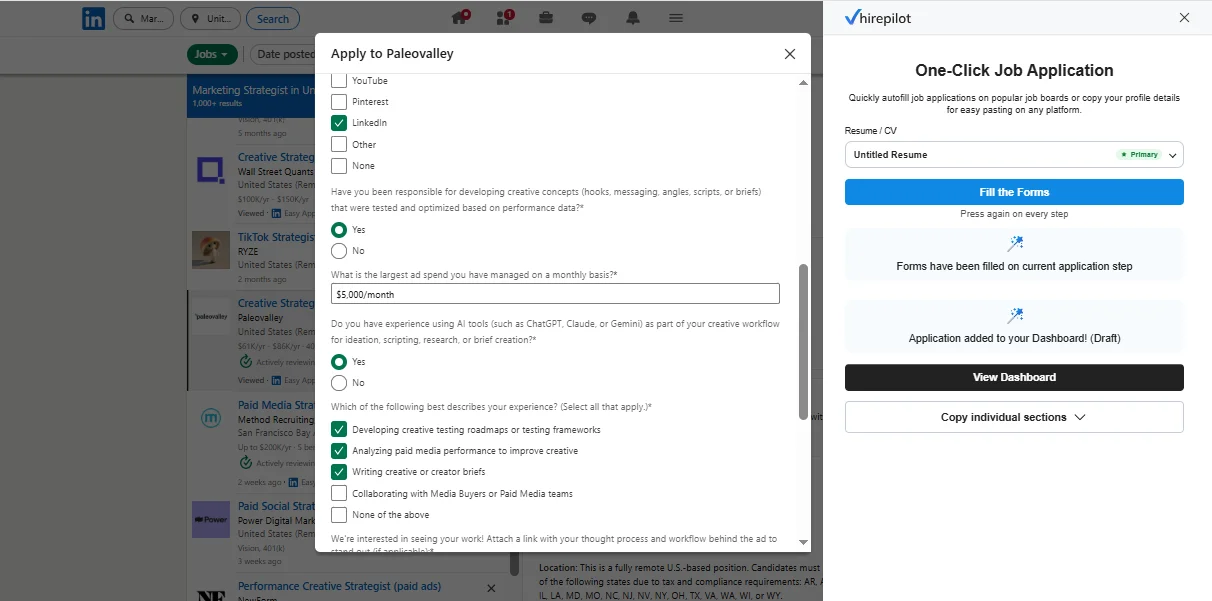
LinkedIn Easy Apply is probably the most frequently used quick-apply flow in professional hiring. When you click "Easy Apply" on a LinkedIn job listing, the extension detects the open form and begins populating the fields: your name, contact details, location, phone number, years of experience by category, education history, resume, cover letter, and screening questions where it can map answers from your profile.
Screening questions are worth addressing honestly. Some questions have structured answer formats, like dropdowns or yes/no toggles, and the extension can handle those when your profile contains a corresponding answer. Others are free-text fields that require a specific, tailored response. In those cases, the extension leaves the field for you to complete manually. It fills what it can and flags what needs your attention. This is a practical approach rather than a perfect one, and it works well for the majority of fields in a standard Easy Apply form.
For a deeper look at how LinkedIn's own application flow works and where it falls short for serious job seekers, LinkedIn Easy Apply limitations is worth reading before you build your strategy around it.
How it works on Indeed
Indeed's application flow varies more than LinkedIn's. Some Indeed listings use a native Indeed application, while others redirect to an employer's own site. The HirePilot extension works with Indeed's native application forms.
When you click "Apply" on an Indeed listing that uses the native Indeed flow, the extension recognizes the form structure and begins populating fields: your name, email, phone, location, work history, education, and resume. Indeed sometimes includes employer-specific screening questions, and the extension handles those on the same terms as LinkedIn: structured fields get filled from your profile, open-ended questions are left for your manual input.
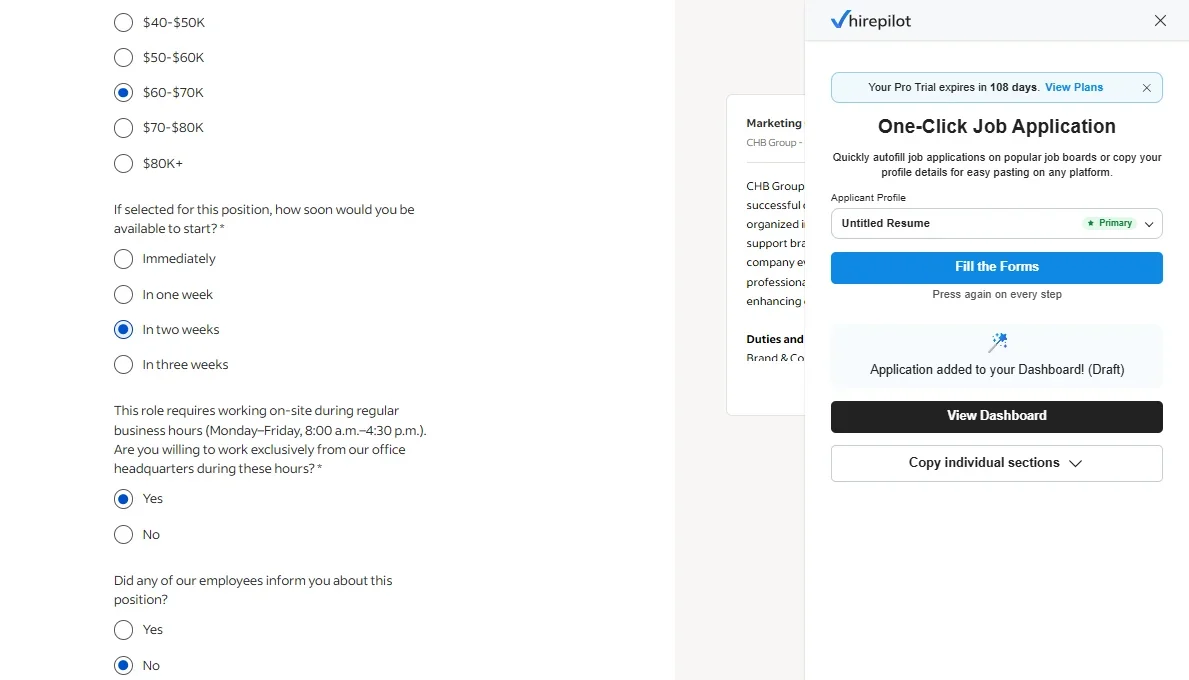
One thing that helps with Indeed specifically is having a complete and well-structured HirePilot profile. Indeed's forms sometimes ask about specific job titles or industries in ways that require a direct match to your experience. The cleaner and more specific your stored work history, the better the extension performs. For a detailed look at how Indeed Easy Apply works, including what employers see versus what you submit, that guide covers the specifics.
How it works on Workday
Workday is where most job seekers lose the most time. Workday portals are long, sometimes spanning four or five pages, and each employer's Workday instance is slightly different. Fields appear in different orders. Some employers include custom screening sections that go well beyond standard resume information. The visual design is consistent across employers, but the content is not.
The HirePilot extension handles Workday by detecting the form fields present on each page of the application and mapping them to your stored profile. It fills contact information, work history entries, education records, and standard questions. Because Workday applications are paginated, the extension works page by page as you advance through the form. You still need to click "Next" to proceed, which gives you a natural checkpoint to review each page before moving on.
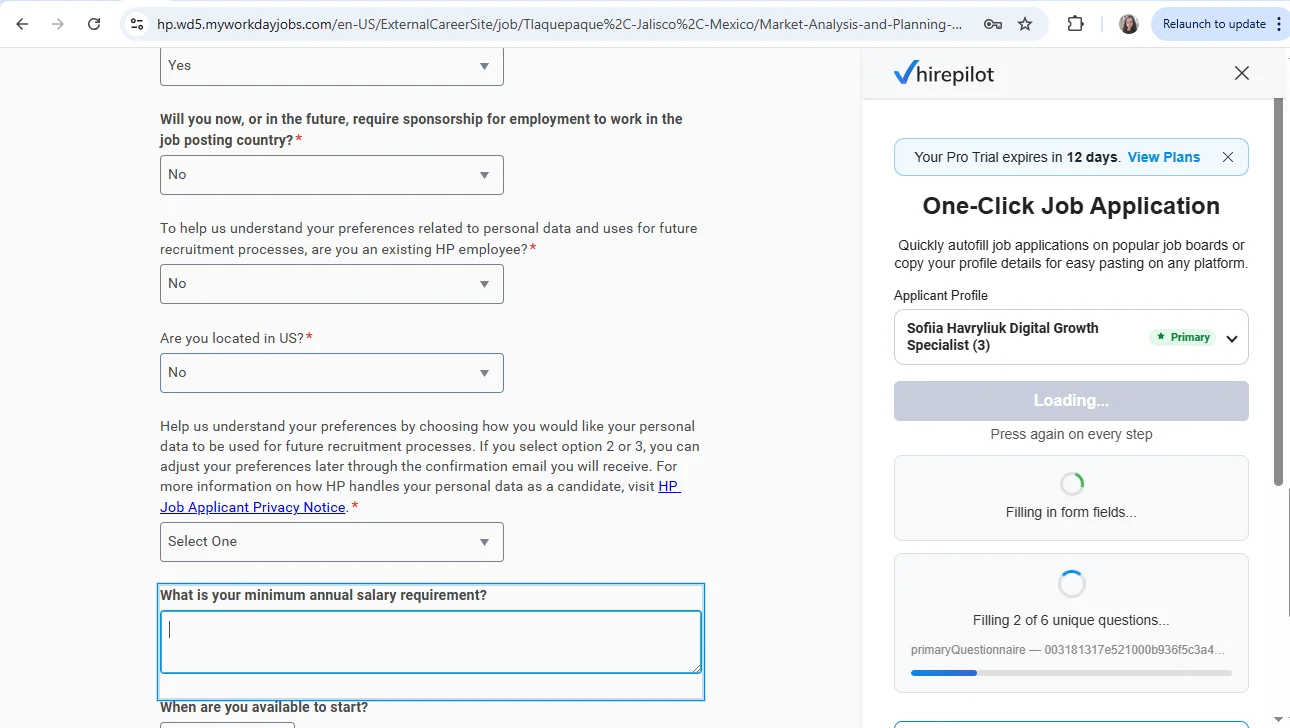
Workday applications that include documents, like uploading a resume or cover letter, require you to attach those files manually. The extension fills the text fields around those upload points. For more context on completing a Workday application faster without an extension, that guide explains the structure of a typical Workday form and why it takes so long without automation.
Privacy and permissions: what the extension sees and does not see
This section deserves clear, direct treatment. When you install any browser extension, you are granting it permission to interact with web pages you visit. Understanding exactly what that means with HirePilot is important.
The HirePilot extension reads the structure of application forms on the platforms it supports. It identifies input fields, labels, and form containers so it can map them to your stored profile data. It does not read your LinkedIn messages, your inbox, your saved jobs, or any content on pages where you are not actively filling an application. It does not capture keystrokes outside of a form fill action.
Your profile data is stored in HirePilot's secure servers and transmitted to your browser locally when you trigger an autofill. The extension does not send your information to any third party. It does not sell your data or share it with employers. You can review the full details in HirePilot's published privacy policy.
On the question of employer visibility: when you submit an application through LinkedIn Easy Apply, Indeed, or a Workday portal, the employer receives your application exactly as it would appear if you had typed every field yourself. There is no metadata in the submitted form that indicates you used an autofill tool. The employer sees your name, your resume, your answers. The method you used to fill the form is not visible to them, in the same way that a spell checker is not visible to the recipient of an email.
This is not a workaround or a loophole. Autofill is a standard browser capability, and using a profile-based autofill tool is no different in principle from using your browser's built-in autofill for passwords or addresses. The extension simply does it more accurately and across more platforms.
The job tracker: the feature that makes autofill matter
Filling forms faster is useful. Knowing what you applied to, when, and what happened next is essential. The HirePilot job tracker is built into the same dashboard as your profile and autofill settings. Every time the extension submits or helps you submit an application, it creates a record in your tracker automatically.
The tracker uses a Kanban board layout: applied, followed up, interviewing, offer, rejected. You can move applications through these stages as your search progresses. Each record captures the job title, company, platform, and date of application. You can add notes, attach the resume version you used, and log contact information if you spoke with a recruiter.
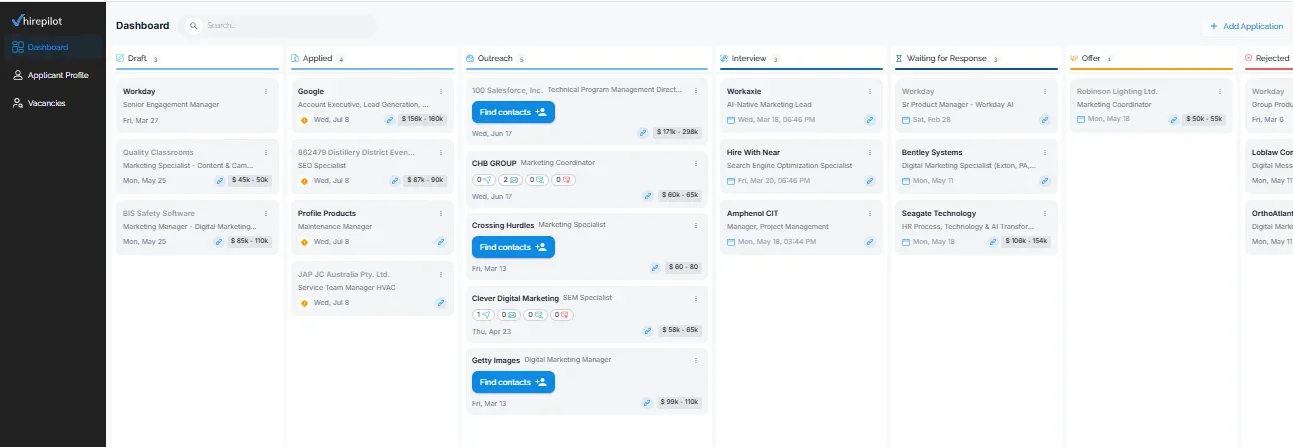
For job seekers applying to dozens of roles, the tracker is what prevents the search from becoming a black hole. Without it, you end up reapplying to companies you already applied to. You miss the optimal window to follow up. You lose context before a screening call. The tracker closes those gaps without requiring you to maintain a separate spreadsheet.
The second half of the equation: recruiter outreach
Filling forms efficiently is one part of a successful job search. The other part is getting your name in front of the right person before the application sits unread in a database. HirePilot's recruiter outreach feature addresses this directly.
Once you have applied to a role, the outreach tool helps you identify the hiring manager or relevant recruiter for that position and send them a personalized, AI-assisted message the same day. This matters because most applications are screened by an algorithm before a human sees them. A direct message to a hiring manager creates a second channel that bypasses that filter entirely.
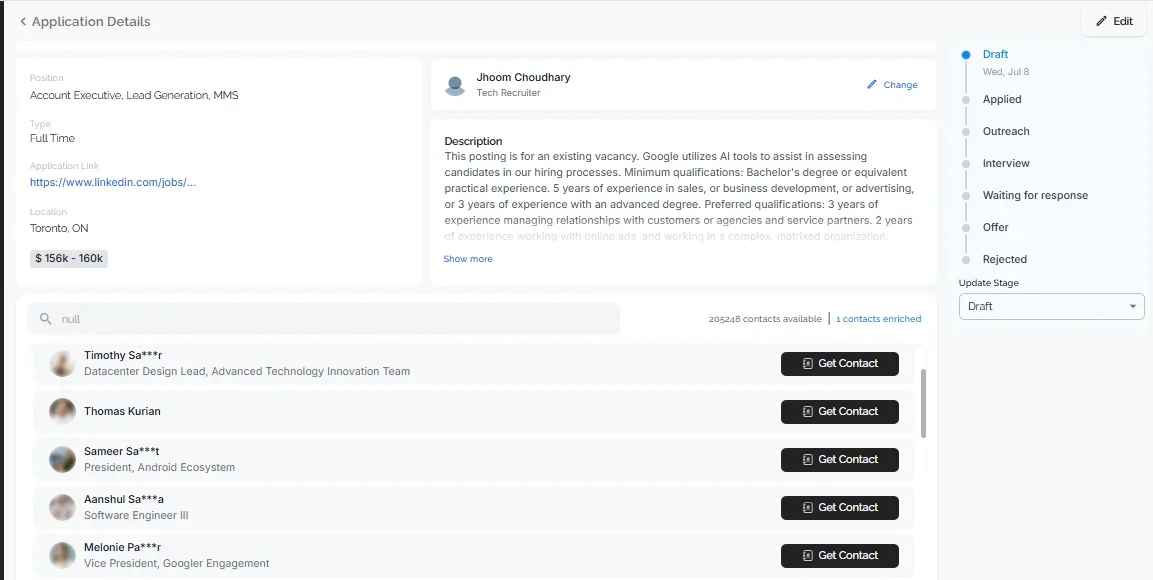
The combination of autofill and outreach is the core of HirePilot's approach. The form fill gets your application into the system. The outreach gets a human to look for it. Neither works as well alone.
The real cost of manual applications is not time, it is decision fatigue
Most discussions about manual form-filling focus on how long it takes. That is a real problem, but it is not the deepest one. The deeper problem is that repeating the same tedious task across dozens of applications depletes the cognitive resources you need to make good decisions about which jobs to pursue, how to tailor your materials, and whether a given role is actually a fit.
Research on decision fatigue shows that people make progressively worse choices as a mental task continues, even when the task feels simple. Filling out your graduation year for the fourteenth time is not mentally demanding in isolation. But it is part of a cumulative load that erodes the quality of your judgment over the course of a session. By the time you reach the job that actually matters most to you, you are operating on less than your full capacity.
Automating the form-filling layer is not just about saving minutes. It is about preserving the mental energy you need to apply it where it counts: reading the job description carefully, crafting a genuine cover letter, and deciding which roles deserve your real attention.
"Most people think they need to apply to more jobs. What they actually need is to spend less time on forms and more time on the five or ten roles where they actually have a strong shot. The extension exists to make that trade possible." Viktor Shumylo, co-founder, HirePilot
Start applying without starting over
If you recognized yourself in the opening scenario, filling the same fields on the fourth platform of the morning while wondering how anyone sustains this long enough to get hired, HirePilot is the direct answer to that problem. The extension fills your forms on LinkedIn Easy Apply, Indeed, and Workday, logs every application to your tracker automatically, and gives you the recruiter outreach tools to make each application count beyond the submission itself.
You can install the extension and start using it today at HirePilot.
Frequently asked questions
What are the best chrome extensions for job seekers?
The most useful Chrome extensions for job seekers are ones that reduce the repetitive work of applying while keeping the job seeker in control of their materials. HirePilot covers autofill across LinkedIn, Indeed, and Workday, plus a built-in job tracker and recruiter outreach tools. Other extensions focus on resume formatting, salary research, or LinkedIn profile optimization, and the best setup often combines two or three tools depending on your priorities.
Is there a chrome extension for applying to jobs on multiple platforms?
Yes. HirePilot's Chrome extension works across LinkedIn Easy Apply, Indeed's native application flow, and Workday employer portals. It fills form fields from a single stored profile, which means you do not need to maintain separate autofill configurations for each platform. Each application is also logged to your tracker automatically.
Does a chrome extension for linkedin job search actually save time?
It depends on how you apply. If you apply to five jobs a week, the time savings are modest but the reduction in friction is noticeable. If you apply to twenty or more roles in a week, the time savings become significant, often an hour or more, and the reduction in data-entry errors becomes more valuable than the time itself.
How does a chrome extension for indeed job search handle screening questions?
HirePilot fills structured screening questions, such as dropdowns, yes/no fields, and numeric inputs, when the answer is available in your stored profile. Free-text questions that require a personalized response are left blank for you to complete. This hybrid approach fills the majority of fields automatically while preserving your control over the answers that matter most.
Can I use a chrome extension for workday job applications without employers knowing?
When you submit a Workday application, the employer receives a completed form. There is no indicator in the submitted data that identifies which tool, if any, was used to fill the fields. Autofill tools work at the browser level and do not attach metadata to the application itself. This is consistent with how all browser-based autofill functions, including the built-in autofill in Chrome.
Find your next job faster - without the chaos
Spend minutes, not hours, on applications. Stay organized, follow up confidently, and get noticed sooner.
Share this article

Viktor Shumylo
Viktor Shumylo is the co-founder of HirePilot, an AI-powered job search platform. He has 10+ years of experience building SaaS products and tools that help job seekers optimize resumes, streamline applications, and land interviews faster.
More articles by Viktor Shumylo