

How to organize and automate job applications without losing personalization

August 11, 2026
Organizing and automating job applications without losing personalization means separating the stable layer, your resume data, work history, and screening answers, from the variable layer, the one sentence in a cover letter or message that references this specific role. Autofill and a Kanban tracker handle the stable layer, freeing five to eight minutes per application for real personalization.
The problem is not effort. Most people applying for jobs are working hard. The problem is that the tools they use were never designed to work together. A spreadsheet tracks what you sent but stores nothing. A Google Drive folder holds your files but gives you no visibility into where each application stands. Browser autofill tools save time but skip personalization entirely. The result is a system that is always one step behind, and the candidate paying the price.
What is a job application organizer, and why does it matter
A job application organizer is any system, tool, or combination of both that gives you a single view of every role you are pursuing. It shows you what you applied to, when, with which version of your resume, what stage each application is in, and what follow-up action is pending. When that system also handles autofill, document storage, and outreach, it becomes a genuine productivity multiplier rather than another thing to maintain.
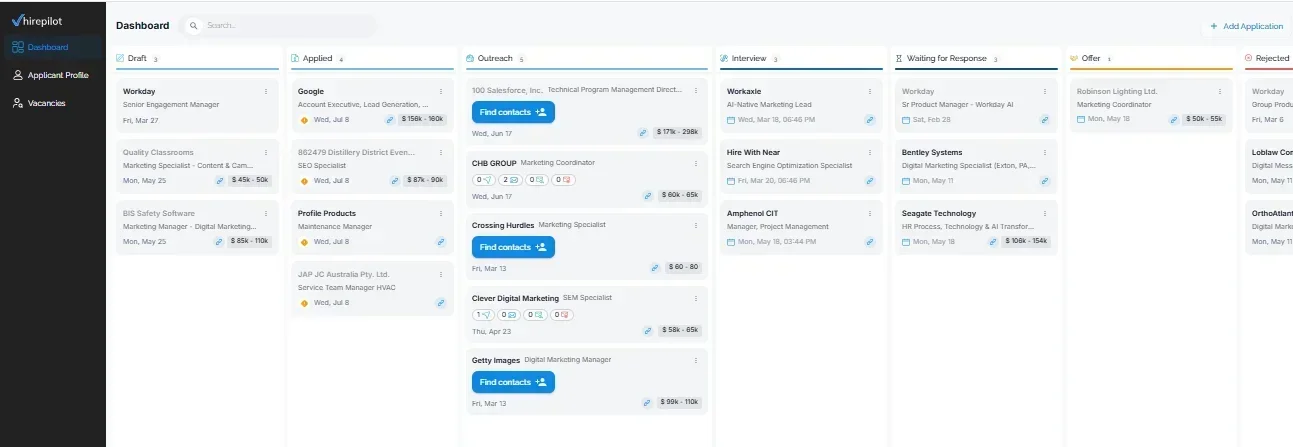
The alternative most people default to is a spreadsheet. Spreadsheets are flexible, free, and familiar, which is exactly why people stick with them long past the point where they stop working. Once you pass 20 or 30 applications, a spreadsheet requires you to manually update every row, leaves your files living somewhere else entirely, and gives you no mechanism for follow-up reminders or message testing. If you want a deeper look at the tradeoffs, the HirePilot job tracker overview explains how a purpose-built tracker handles what spreadsheets cannot.
How to track job applications without a spreadsheet
Tracking without a spreadsheet means using a visual pipeline, usually a Kanban board, where each application moves through stages you define. Common stages are Saved, Applied, Phone Screen, Interview, Offer, and Rejected. Each card in the pipeline holds the job title, company, date applied, resume version used, and any notes about the role or the hiring manager.
The key advantage over a spreadsheet is that the pipeline is the database. You do not update a row and then go find a file. Everything attached to that application, including the specific cover letter you wrote and the status of your follow-up, lives on the same card. Purpose-built trackers also surface what needs attention, which applications have gone silent after two weeks, which roles are advancing, and which are stalled, without you having to scan rows and columns to figure it out.
Step-by-step: how to set up a tracking system without a spreadsheet
- Choose a tool that gives you a Kanban view and document attachment capability (more on specific tools below).
- Create your pipeline stages before importing anything. Keep the list short. Five to six stages is enough.
- Add every active application you already have in progress. Do not try to reconstruct old ones unless they are still live.
- Attach the resume version and cover letter you used to each card. Name files clearly: Resume_v3_ResearchFocus.pdf and CoverLetter_Stanford_BioPhysics.pdf are searchable. ResumeFinal2.pdf is not.
- Set a follow-up date on every card at the time of submission. Two weeks is a reasonable default for most roles.
- Review the board for 10 minutes every Monday morning. Move cards, archive closed roles, and flag anything that needs a follow-up message that day.
How to store multiple resumes and cover letters
Most professionals applying to more than one type of role need at least two or three resume versions. A research scientist might have a version optimized for industry R&D roles, a shorter one for consulting positions, and a third that emphasizes communication and teaching for roles in science policy or education. Each of those also pairs with different cover letter templates.
Storing these documents in a job application system rather than a cloud folder solves a specific problem: you always know which document was sent to which employer. Cloud folders are fine for storage, but they have no linkage to the application record. Two months into your search, you will not remember which cover letter you customized for a biotech startup versus a national lab, and you cannot reproduce what worked.
Document storage best practices
Name every file with a consistent convention that includes the version number, the target role type, and the date last modified. Store master templates separately from submitted versions. Once a document goes out, treat it as a snapshot and never overwrite it. Inside a purpose-built job tracker, attach the submitted snapshot to the specific application card. Keep your editable master templates in a named folder that is never used for submission, only for drafting.
Best application automation software: pros, cons, and pricing tiers
This section covers the main categories of tools and what each does well. No single tool other than HirePilot covers all four functions, which is why most job seekers end up with three or four separate products that do not talk to each other.
Category 1: browser autofill extensions
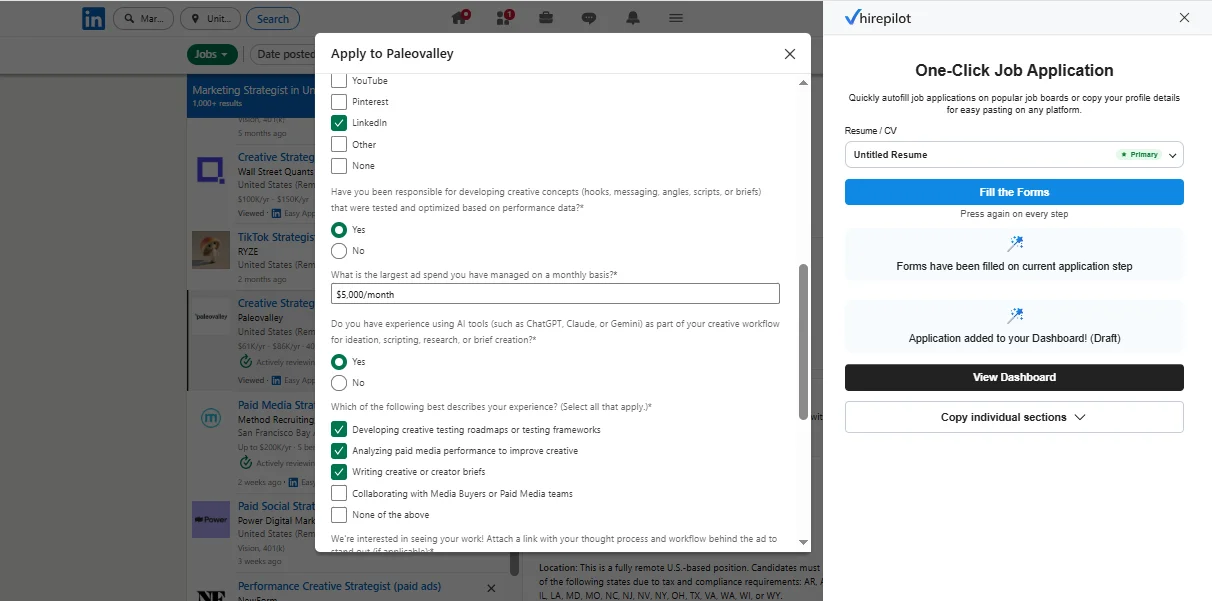
These tools detect job application forms in your browser and populate fields using a stored profile. The better ones handle Workday, LinkedIn Easy Apply, and Indeed. Simpler ones only handle basic HTML forms and fail on multi-step portals.
Pros: Saves five to fifteen minutes per application. Reduces data entry errors.
Cons: Most do not store document versions, do not track submissions, and do not handle outreach. Many fail on dynamic or multi-step forms without manual intervention.
Typical pricing: Free tiers with limited profiles. Paid tiers range from roughly $5 to $20 per month depending on the number of profiles and supported platforms.
Category 2: application tracking dashboards
These tools give you the Kanban pipeline, document storage, and submission history. Some integrate directly with job boards. Others require manual entry.
Pros: Centralized pipeline. Some offer reminder and follow-up prompts. Better visibility than any spreadsheet.
Cons: Most do not include autofill. Outreach features are usually absent or basic.
Typical pricing: Free tiers exist but cap the number of active applications, often at 10 to 25. Paid tiers typically run $8 to $25 per month. Some tools aimed at career coaches charge more for team features you do not need as an individual.
Category 3: outreach and recruiter contact tools
These tools help you find hiring managers and send personalized cold messages. Some integrate with LinkedIn. Others provide verified email addresses.
Pros: Directly addresses the visibility problem that autofill alone cannot solve.
Cons: Most have no connection to your application tracker, so outreach activity is not linked to the application record.
Typical pricing: Entry-level plans start around $10 to $30 per month. Higher tiers with larger contact databases and more sends per month can reach $50 to $100 per month.
Category 4: all-in-one platforms
HirePilot is the primary example in this category. It combines a job board, browser autofill for LinkedIn Easy Apply, Indeed, and Workday, a Kanban tracker that auto-saves when you autofill, and recruiter outreach in a single system. The autofill and tracker work together so that submitting an application creates the tracking record automatically. The outreach feature then lets you find the hiring manager for the same role and send a personalized AI-drafted message the same day.
Pros: One login, one place for documents, one pipeline, and outreach linked to the same application record. Eliminates the need for three or four separate tools.
Cons: If you only ever apply to one type of role using one resume, the document versioning features are more than you need.
Typical pricing: HirePilot's free plan covers auto-apply forms, the Kanban tracker, pipeline stages, and access to five decision-maker contacts. The paid plan runs $29 a month, unlocking unlimited decision-maker contacts, pre-drafted outreach templates, and in-platform outreach messaging, details visible on HirePilot's current pricing plans.
Pricing tiers to consider
When budgeting for job application tools, think in terms of what each tier unlocks rather than the monthly dollar amount.
Free tier: Adequate if you are applying to fewer than 20 roles, using one resume version, and comfortable with manual tracking. Most free tiers give you autofill or tracking but not both.
Entry paid tier ($5 to $15/month): Unlocks multiple document profiles, more active applications in the pipeline, and usually basic reminder features. This is the right level for most active job seekers applying to 5 to 15 roles per week.
Mid tier ($15 to $30/month): Adds outreach functionality, A/B message testing, export features, and integrations with job boards. If you are running a serious search across multiple role types and want to message hiring managers, this is the tier where the time savings start to clearly outweigh the cost.
Upper tier ($30 to $100/month): Relevant mainly if you are a career coach managing multiple clients, or a recruiter using the tool commercially. Individual job seekers rarely need this tier.
The honest math: if you are spending 30 minutes manually filling out each application and applying to 10 roles per week, you are spending roughly five hours per week on form entry alone. A mid-tier tool that cuts that to 45 minutes per week pays for itself in time within the first day of the month.
Step-by-step setup for secure storage, autofill, and weekly exports (non-technical guide)
This section is written for someone who has never set up automation before and is comfortable with basic browser extensions.
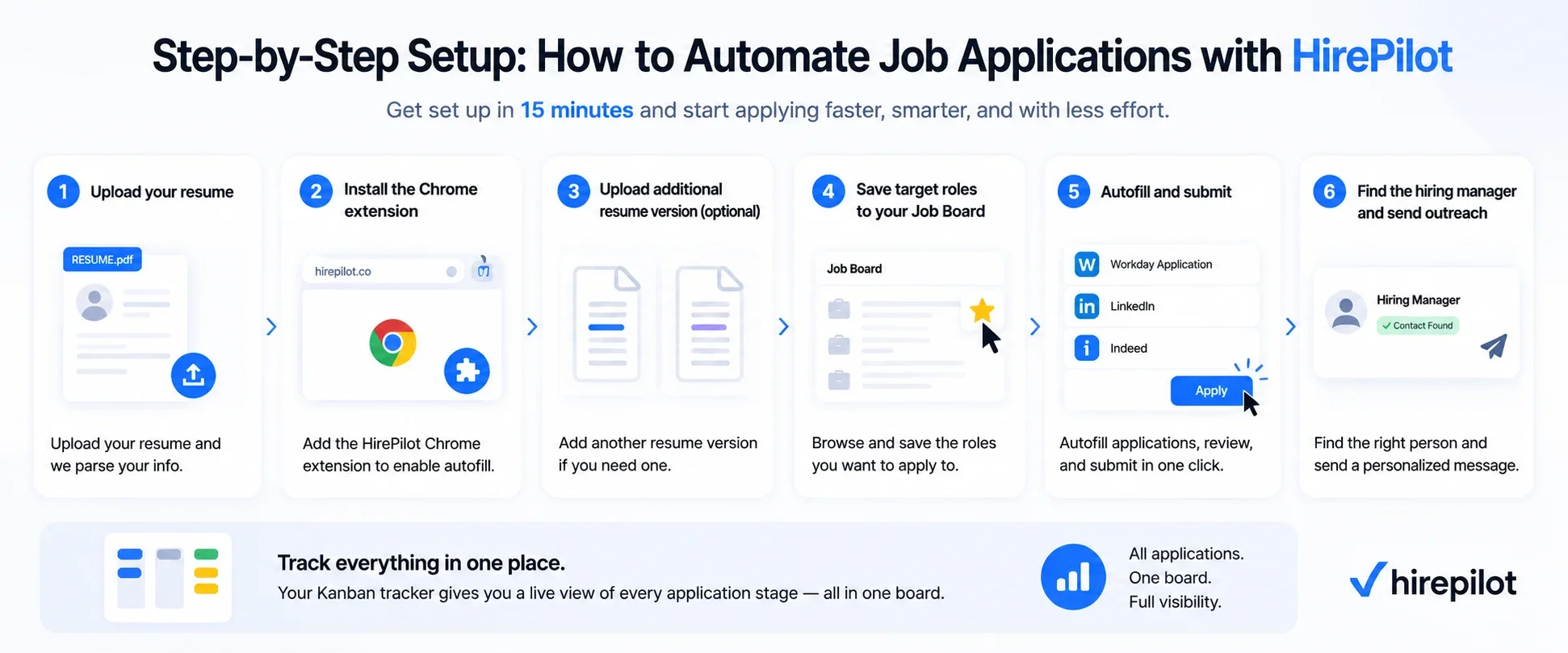
Setting up HirePilot takes about 15 minutes and does not require any coding or technical background. The process starts with your resume, not a manual data entry form, and results in a live profile, an installed extension, and an active outreach tool by the end.
Step 1: Register and upload your resume.
Create your account and upload your resume. HirePilot automatically parses your work history, education, and skills from the file. Review the parsed fields and correct anything the parser missed or misread, for example an unusual job title or a publication listed as an employer. This becomes the data source autofill will use later.
Step 2: Install the Chrome extension during onboarding.
Onboarding prompts you to install the HirePilot Chrome extension. This is the autofill engine. It connects directly to the profile data you just built in step 1.
Step 3: Upload additional resume version if you need one .
If you are applying to both academic and industry roles, upload a second resume version, for example a long-form academic CV alongside a shorter industry-style resume. Both are stored in your account and available to attach when you apply.
Step 4: Save target roles to your Job Board.
Browse or search the Job Board and mark roles you want to apply to as favorites. This keeps your target list in one place instead of scattered across browser tabs or a spreadsheet.
Step 5: Autofill and submit.
Open a saved role's application form and click the HirePilot extension. It autofills the form from your profile data across LinkedIn Easy Apply, Indeed, and Workday, including multi-page screening questions. Review the fields, attach the correct resume version if you have more than one, and submit. The application saves to your Kanban tracker automatically the moment you submit. If a portal is not compatible with autofill, for example an institutional academic system, you can add that application to the tracker manually so it stays in the same pipeline.
Step 6: Find the hiring manager and send outreach.
From the tracker, use Recruiter Outreach on the same role. It identifies the hiring manager or relevant decision-maker and drafts a personalized message. Review and send it the same day you apply, so the application and the direct contact happen together.
Your Kanban tracker gives you a live view of every application's stage at any point, academic and industry roles together on the same board.
What automation features matter most: form filling, tracking, and A/B testing outreach messages
Not all automation features are equal. For a busy professional, three capabilities separate genuinely useful tools from ones that create more overhead than they save.
Form filling
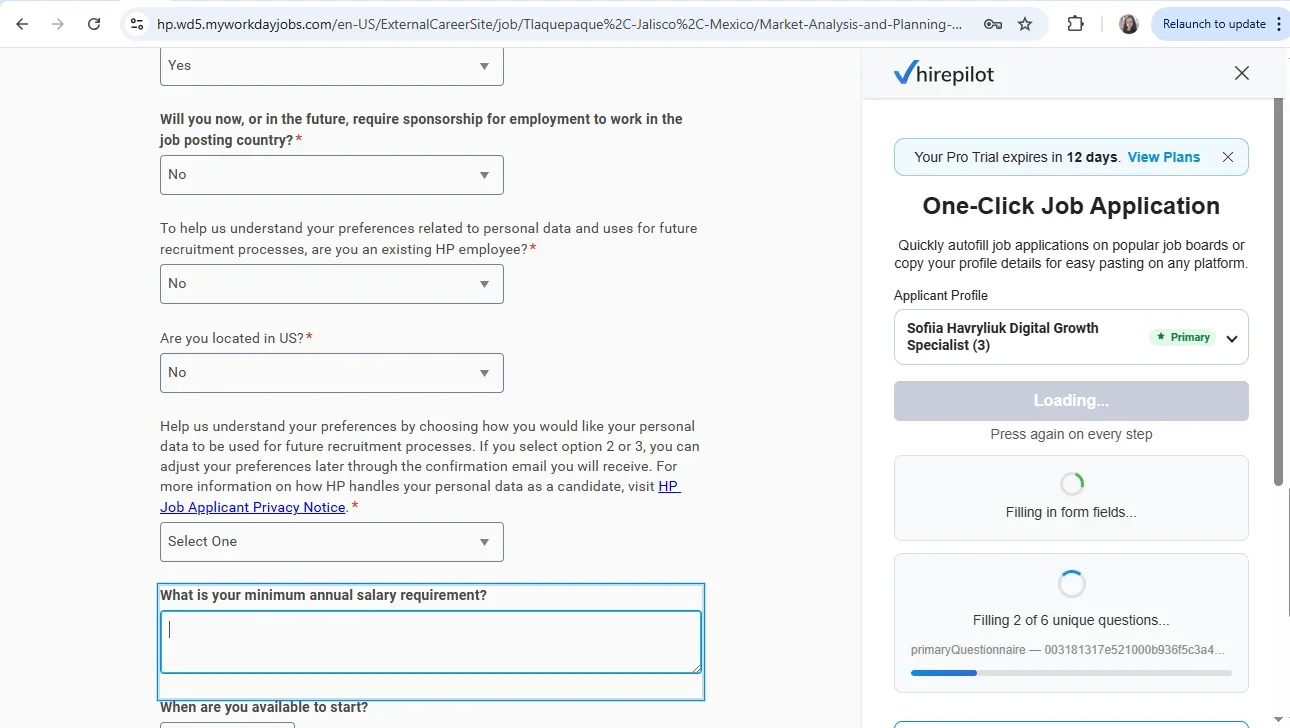
The most important characteristic of a good autofill tool is accuracy on complex portals. LinkedIn Easy Apply is relatively simple. Workday is not. Applications built on Workday's recruiting platform often have multi-step logic, conditional fields, and screening questions that a basic form filler will skip or mishandle. The best tools, including HirePilot, fill these fields and flag any question they cannot handle so you can answer manually rather than leaving it blank. A tool that fills 80 percent of a Workday form correctly and alerts you to the other 20 percent is genuinely useful. One that silently fails or crashes on step three is not.
Submission tracking
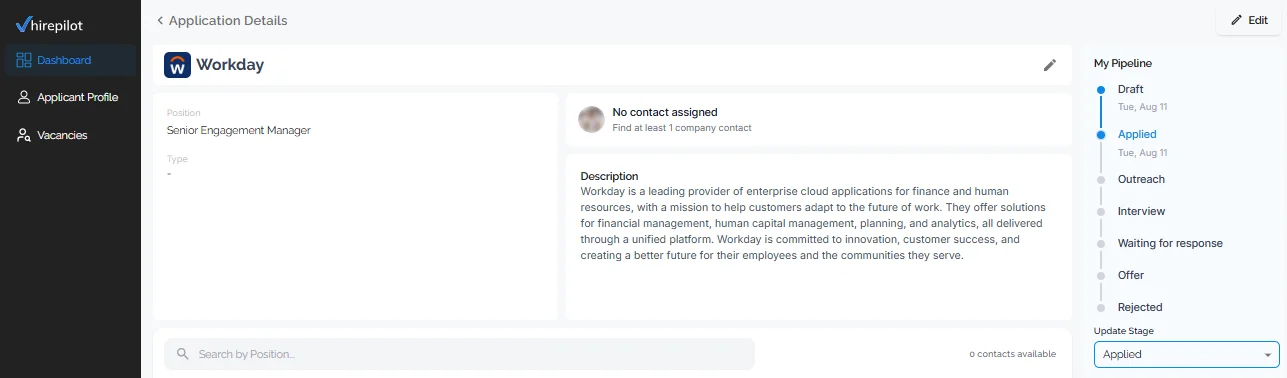
Tracking should happen automatically as a byproduct of applying, not as a separate manual step. If you have to go back and log the application after you submit it, you will eventually stop doing it. The auto-save feature in HirePilot, where submitting via autofill creates the tracker card instantly, is the behavior you want. Status updates, notes, and follow-up dates should all be editable from the same card without switching to another tool.
A/B testing outreach messages
This is the feature most job seekers do not think about until they realize that the volume of applications they are sending is not producing responses. A/B testing your outreach messages means sending two versions of a cold message or follow-up email to different contacts and tracking which version generates more replies.
Example workflow:
You are applying to senior scientist roles at biotech companies. You draft two versions of a message to the hiring manager.
Version A leads with your research background: "I have spent the past six years working on protein folding mechanisms at the intersection of computational modeling and wet lab validation."
Version B leads with a specific observation about the company: "Your recent phase two trial data on [target] suggested a structural approach I have been exploring in my current work."
You send Version A to 10 hiring managers and Version B to 10 others, using contacts from similar-sized companies in the same sub-sector. After two weeks, you count the replies. If Version B generates 4 responses and Version A generates 1, you have data. You shift to Version B as your default and test a new variable in the next batch.
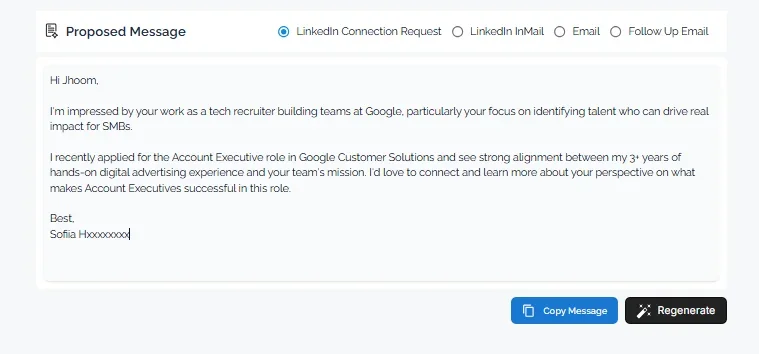
HirePilot's outreach feature supports this by generating a personalized message for each hiring manager through LinkedIn, the LinkedIn inbox, or email, and letting you regenerate a new draft on the spot if an angle is not landing. Every message and follow-up stays attached to the same outreach record, so you can see which angle led to a reply without opening a separate spreadsheet.
For more on structuring effective outreach messages, this guide on personalizing cold outreach covers the mechanics of what makes one message land and another get ignored.
Common job application mistakes to avoid
Automation introduces a specific category of mistakes that manual applications do not. These are worth naming directly.
Sending the wrong resume version. If you do not check your default document profile before applying, you may submit a resume optimized for a different role type. Review your selected documents at the start of every application session.
Over-relying on autofill for cover letters. A cover letter that is entirely autofilled and never edited is a generic cover letter. Use autofill to populate the structure and your standard opening paragraph, then manually add one or two sentences specific to the company or the role. That small addition is what separates a personalized letter from a template.
Applying to too many roles simultaneously without follow-up. Volume is not a strategy if you are not following up. A pipeline of 50 applications where 40 never received a follow-up message will underperform a pipeline of 25 where every role got a thoughtful follow-up at the two-week mark.
Skipping the screening questions. Many autofill tools do not handle screening questions well. Do not assume they have been answered correctly. Read every question before submitting, especially binary questions about visa status, salary requirements, or required certifications where an incorrect auto-selected answer will disqualify you immediately.
Never testing your outreach. Sending the same message to every hiring manager and wondering why you do not hear back is a solvable problem. The A/B testing workflow described above takes about 20 extra minutes to set up and produces actionable data within two to three weeks.
The signature insight: personalization scales when you separate the template from the variable
The reason most automation advice tells you to choose between speed and personalization is that it treats the entire application as one unit. But an application has two distinct layers: the stable layer, which is your background, credentials, and experience, and the variable layer, which is your interpretation of this specific role at this specific company.
Autofill tools are excellent at the stable layer. They should handle everything that does not change from application to application. The variable layer, which is one paragraph in a cover letter, one specific observation in a recruiter message, and one relevant project or paper you flag for this employer, takes five to eight minutes to write when the stable layer is already filled in.
The practical implication is that you should never try to automate the variable layer. Instead, build your automation to handle everything else so that the five to eight minutes of genuine personalization is all you are spending per application. At 10 applications per week, that is less than 90 minutes of personalized writing, which is manageable. Without automation handling the rest, that same week costs you eight to ten hours.
"The people who get the best results with HirePilot are the ones who use autofill to clear the administrative work, then spend the time they saved on one specific, genuine sentence in their outreach. Recruiters notice a message that references something real about the role. They cannot notice how long the form took to fill out." Viktor Shumylo, co-founder, HirePilot
If you started this article with a browser full of open tabs, a spreadsheet that is two weeks out of date, and a vague sense that your applications are going into a void, the setup described here is a direct answer to that situation. A centralized pipeline, document storage linked to each submission, browser autofill that works on the portals that matter, and outreach testing that improves your response rates over time: these are the four components that replace the mess. HirePilot brings all four into one system so you are not stitching tools together and losing context every time you switch between them.
Frequently asked questions
How do I organize job applications without losing track of which resume I sent?
Use a job tracker that attaches document records to each application card at the time of submission. When autofill and tracking work together, the specific resume version is saved automatically with the application record. Reviewing which version you sent is then a one-click action rather than a memory exercise.
How to track job applications without a spreadsheet
A Kanban pipeline tracker replaces a spreadsheet by giving each application its own card that moves through defined stages. Cards hold all attached documents, notes, and follow-up dates in one place. Auto-save features that trigger on submission eliminate the manual logging step that causes most spreadsheets to fall out of date within the first two weeks of use.
How to store multiple resumes and cover letters for different role types
Store each version in a dedicated document library inside your job application platform, named by role type and version number rather than by generic file names. Attach the specific version used to each application record at submission time. Keep editable master templates in a separate folder that is never used for direct submission, so submitted versions remain unchanged as reference records.
What are the most common job application mistakes to avoid with automation?
The most common mistakes are sending the wrong document version because the default was not checked before applying, submitting autofilled cover letters without adding any role-specific content, skipping manual review of screening questions that autofill may have mishandled, and applying at volume without scheduling follow-up messages. Each of these is preventable with a brief pre-submission checklist and a follow-up reminder set at the time of application.
How do I personalize outreach messages to hiring managers with HirePilot?
Generate a first draft of your message to the hiring manager from the same application record, then edit it or regenerate a new version if the tone or angle does not feel right, before sending it as a LinkedIn message, a LinkedIn inbox follow-up, or an email. Reviewing replies in the same outreach history shows which angle worked for a given role type without switching to a separate spreadsheet.
Find your next job faster - without the chaos
Spend minutes, not hours, on applications. Stay organized, follow up confidently, and get noticed sooner.
Share this article

Viktor Shumylo
Viktor Shumylo is the co-founder of HirePilot, an AI-powered job search platform. He has 10+ years of experience building SaaS products and tools that help job seekers optimize resumes, streamline applications, and land interviews faster.
More articles by Viktor Shumylo